

What if the countdown meant to keep you on track is the very thing pulling you out of focus? If a digital timer makes your heart race or leaves you checking the clock through every meeting, you’re not alone. Reducing time anxiety at work may start with changing how time reaches your attention, not with trying harder to ignore it.
Digital countdowns can invite you to monitor each passing minute. Repeated checks may turn time into a source of pressure and make it harder to settle into focused work. A quieter sensory cue can offer time awareness without demanding the same attention. Instead of reading numbers, you can notice a gradual visual change in your peripheral vision.
This guide explores why visible countdowns can feel stressful and how sensory-based time awareness may support a calmer workday. You’ll find practical ways to reduce clock-watching, protect focus, and distinguish time-perception challenges from procrastination. The goal isn’t to lose track of your schedule. It’s to make time feel like a guide rather than a constant demand.
Key Takeaways
- Learn how deadline pressure can prompt a stress response, and recognize signs that time anxiety is affecting your workday.
- Explore why frequent clock checks can interrupt concentration, then consider gentler ways to stay aware of time.
- Try sensory-based strategies, including peripheral visual cues and color-coded work blocks, to make transitions feel less abrupt.
- Understand how time blindness differs from procrastination, so you can choose support that fits the challenge.
- Discover how reducing time anxiety at work can begin with a calmer approach to timekeeping, including silent visual cues that don’t demand constant attention.
What is Time Anxiety and Why is it Rising at Work?
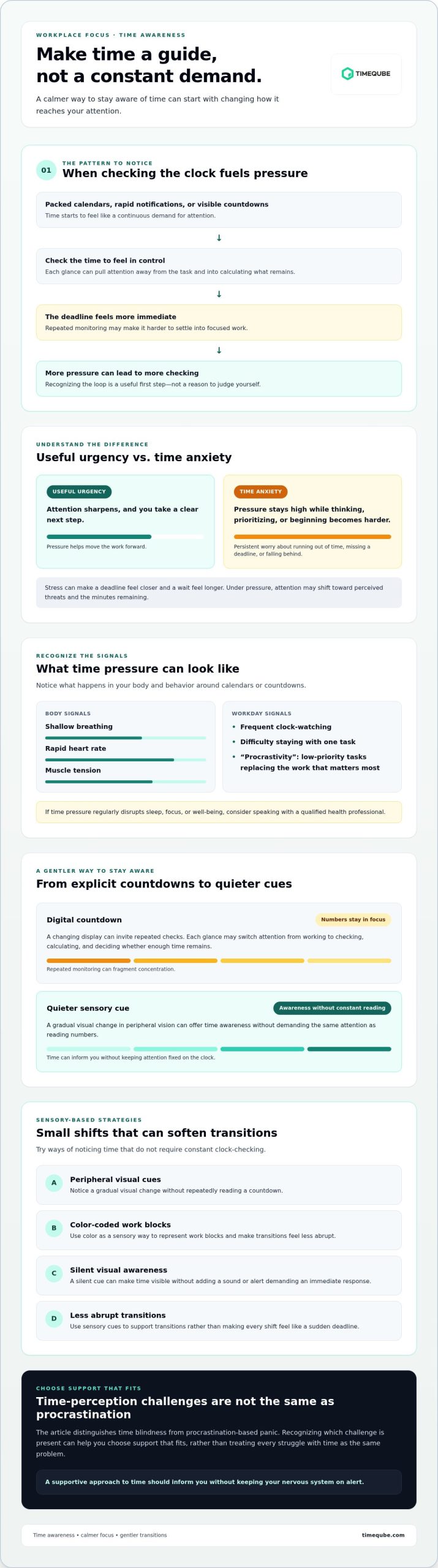
Time anxiety is persistent worry about running out of time, missing a deadline, or falling behind. A demanding task can create useful urgency: attention sharpens, and you take a clear next step. Time anxiety is different when the pressure stays high even as you work, making it hard to think, choose priorities, or begin.
Tightly packed calendars, rapid notifications, and visible countdowns can make time feel like a continuous demand for attention. Each alert or clock check adds another interruption. This can create a loop: you monitor time to feel in control, but repeated monitoring makes the deadline feel more immediate. Reducing time anxiety at work starts with recognizing that pattern, not judging yourself for it.
A neuroscientist explains how the brain’s threat response relates to anxiety in this TED talk:
The Science of Time Perception
Time is experienced subjectively, and stress can make a deadline feel closer or a wait feel longer. This distorted perception of time can make it harder to estimate how long a task will take. In a state of flow, attention is absorbed in the work, so time may seem to pass with less effortful monitoring. Under pressure, attention may shift toward perceived threats and the minutes remaining.
The amygdala helps process signals associated with threat and can contribute to the body’s stress response. When a deadline feels dangerous rather than manageable, that response may include heightened alertness and a racing heart. Chronophobia is the clinical fear of time passing.
Symptoms You Shouldn’t Ignore
Notice what happens in your body and behavior when you check a calendar or countdown. Shallow breathing, a rapid heart rate, and muscle tension can signal rising stress. Frequent clock-watching, difficulty staying with one task, or “procrastivity,” when low-priority tasks replace the work that matters most, can also be signs to pay attention to.
Occasional deadline pressure is part of working life. Persistent anxiety can make recovery harder and contribute to exhaustion over time. If time pressure regularly disrupts sleep, focus, or well-being, consider speaking with a qualified health professional or exploring self-care and mental health guides from platforms like Lumina. A supportive approach to time should inform you without keeping your nervous system on alert.
Why Digital Timers and Ticking Clocks Increase Workplace Stress
A timer can make time visible, but a constantly changing countdown can also pull attention away from a task. Each glance asks you to switch from working to checking, calculating how much time remains, and deciding whether that is enough. This repeated monitoring can fragment concentration, especially during complex work that needs sustained attention.
Notifications add another interruption. A sound, flash, or alert may feel like a demand for an immediate response, even when it’s only a reminder. In a quiet office, a ticking clock can have a similar effect: its repeated sound keeps time in awareness and may feel increasingly intrusive as a deadline approaches. Workplace pressures have several sources, as the Occupational Safety and Health Administration outlines in its overview of workplace stress.
The Cognitive Load of Digital Distraction
Opening a separate screen or tool to start and monitor a timer adds another task to the work already underway. The interruption may be brief, but it can break a train of thought and make it harder to return to a detailed problem. This can matter in creative work, where ideas may develop through uninterrupted reflection.
A visible countdown can also shift attention from the work itself to the shrinking amount of time available. Time-boxing may provide structure, but if each block brings an alert or prompts repeated checks, that structure can feel punitive rather than supportive. For a closer look at how visual cues can support meeting awareness, read The Science of the Professional Meeting Timer.
Moving Beyond the “Punitive” Clock
Numbers make elapsed minutes and remaining time explicit. For some people, that precision is useful. For others, it keeps attention fixed on what seems to be disappearing rather than on the conversation, task, or moment at hand. Using a non-numerical cue is one way to keep a sense of structure while easing the focus on a countdown.
Try setting a clear intention for a work period, then placing time awareness somewhere it doesn’t demand constant interaction. A silent, color-changing visual timer, for example, can provide a peripheral cue rather than another screen to check. This shifts timekeeping from active monitoring toward passive awareness. If you’re considering a physical visual timer for meetings, explore the Timeqube for business meetings. Reducing time anxiety at work doesn’t mean ignoring deadlines. It means staying oriented without letting the countdown become the focus.
5 Sensory-Based Strategies for Reducing Time Anxiety at Work
Small changes to the way time appears and sounds can make it easier to stay engaged without repeatedly checking a clock. These strategies focus on gentle cues and a less cluttered workspace. They’re options to test, not rules to follow. For background on what is time anxiety and how it can show up, see Healthline’s overview.
- Use peripheral vision for time awareness. Place a visual cue where you can notice it without turning away from your task. A gradual change in ambient color may be less demanding than reading digits or responding to an alarm. Notice whether the cue helps you stay oriented without drawing your direct attention away from work.
- Give work blocks gentle color signals. Choose a distinct visual cue for a focused work period and another for a transition or break. Keep the signals consistent so they become familiar reminders rather than urgent alerts. Start with a manageable block and adjust it to the task, rather than treating the color change as a measure of performance.
- Reduce auditory triggers. If ticking sounds or alarms make you tense, try a silent way to mark time. A physical, light-based visual timer can provide a cue without adding sound or another digital interruption. This may suit people who prefer a quieter workspace.
- Practice “Time-Sight.” Treat this as a simple habit, not a clinical technique: notice a time cue in your peripheral vision, then return your attention to the task instead of checking exact minutes. The aim is to stay oriented without making time the main object of attention.
- Simplify your desk environment. Clear unnecessary visual items and keep only tools that support the work or help you feel settled. A calmer desk may reduce visual clutter, but it shouldn’t be presented as a proven way to lower cortisol. Choose functional objects with care. For example, a visual timer for business meetings can add a time cue without a screen or ticking sound, while mindful resources and reflective publications from Glimpses Inside can foster a more grounded, restorative workspace.
Build a Calming Office Sanctuary
Keep the setup practical. Place a silent visual timer within view but outside the center of your workspace, then notice whether it helps you stay present or draws your attention too often. Teams can also consider custom-branded visual timers as wellness-focused corporate gifts. A tool alone can’t resolve every source of workplace pressure. Reducing time anxiety at work is more likely to feel supportive when the environment offers gentle cues, clear priorities, and room to focus.
Overcoming Time Blindness and Procrastination-Based Panic
Time blindness describes difficulty sensing how much time has passed or estimating how long a task will take. It can occur alongside ADHD and other forms of neurodivergence, though experiences differ from person to person. A worker may become deeply absorbed in a task, then discover that a meeting is about to begin. The resulting rush can look like poor planning from the outside, but the underlying challenge may be time perception, not a lack of effort.
Calendars and schedules show when events are meant to happen. They don’t always make the passage of time between those events feel perceptible. For someone who struggles to sense time internally, a full calendar can add pressure without answering the immediate question: “How much of this work period remains?” Helpful systems make time easier to notice while keeping attention on the task.
Making Time Tangible
A physical visual timer can act as an external reference point: its changing light offers a visible cue without requiring a calendar check or screen interaction. Place it where you can notice it without turning away from your work. Treat the cue as information, not a test of how quickly you’re progressing. For more ideas on supporting different ways of experiencing time, see Time Management for Neurodiversity.
Try pairing a visual cue with one concrete task, such as drafting an outline before your next meeting. This gives the work period a tangible beginning and ending. It may also make transitions easier to anticipate, particularly when moving between independent work and a scheduled conversation.
Ending the Procrastination Cycle
Time-related anxiety can make a task feel so urgent or large that starting becomes difficult. Procrastination may then offer brief relief, while leaving the deadline closer and the pressure stronger. Reduce the entry barrier by naming the smallest useful first action: open the document, write a heading, or gather the materials you need.
You can adapt the “five-minute light” rule as a gentle starting practice: choose one small action and work on it for five minutes, using a visual cue to mark the beginning if helpful. The aim is to begin, not to promise that the whole project will be finished. Before moving to the next task, create a clear transition, such as saving your work and noting the next step. These modest cues can support reducing time anxiety at work without relying on panic as motivation.
If a physical visual timer might help make time more tangible, explore the Timeqube visual timer as one option for creating a quiet external time cue.
The Timeqube Philosophy: Reclaiming Focus Through Gentle Visual Cues
Timeqube takes a quieter approach to timekeeping. Its physical, light-based timer uses color changes as a visual cue, so you can notice time passing without repeatedly reading a countdown. The aim isn’t to make deadlines disappear. It’s to offer ambient awareness that can help you stay oriented while keeping attention on the work or conversation in front of you.
Because the timer is hardware-only, it doesn’t add another digital display or notification to your workspace. This may suit people who find screens and alerts distracting. It’s a tool, not a treatment, and people’s needs differ. Timeqube for Mind/Body Therapies is a physical visual timer designed for therapeutic sessions.
Tranquil Timekeeping for Professionals
In a business meeting, a shared visual signal can make the passage of time easier for participants to notice without interrupting the conversation with ticking or frequent verbal reminders. Color-coded cues can help a group recognize a transition, such as moving toward the close of a discussion, while keeping the meeting’s purpose in view. They won’t resolve every cause of meeting fatigue, but they can support a calmer way to keep time together. If back-to-back meetings are leaving your team drained, it may also be worth exploring how to avoid meeting fatigue through structural changes that go beyond the calendar.
A shared visual cue offers one way to make time visible without adding another sound or digital alert to a meeting.
Getting Started with Sensory Time Management
Start with one recurring work block or meeting. Set a clear intention and use a physical visual timer as the time cue. Place it where it’s easy to notice in your peripheral vision. At the end, consider whether it helped you stay present or whether you prefer another method. Keep the approach that feels useful.
For teams, Timequbes with Your Logo can serve as branded productivity tools, pairing a shared visual cue with your organization’s branding. Introduce any new tool as an option, not a demand. A supportive time practice should leave room for individual preferences.
Reducing time anxiety at work is not about squeezing more activity into every hour. It’s about making time visible in a way that supports attention instead of policing it. Time is a resource to be lived, not a deadline to be feared.
Make Time a Calmer Part of Your Workday
Reducing time anxiety at work doesn’t mean ignoring schedules or deadlines. It means finding ways to stay oriented without letting timekeeping compete with your attention. Notice which cues increase pressure, choose a gentler alternative, and create clear, manageable transitions between tasks.
Time blindness and deadline anxiety can call for external cues that make time easier to perceive. A visual timer offers one option: Timeqube uses color-coded light signals to provide time awareness without requiring a digital display. It’s a physical, hardware-based tool for work periods, meetings, and mind/body therapy sessions.
Small changes can help make the workday feel more intentional. Try a calmer time cue for one meeting or focus period, then notice whether it supports your concentration. To explore a physical approach, discover the Timeqube visual timer.
Your attention deserves support, not constant pressure. With a timekeeping approach that fits your needs, you can meet the day with greater steadiness and focus.
Frequently Asked Questions
Is time anxiety at work a real psychological condition?
Time anxiety at work is a real experience, but it isn’t automatically a standalone psychological diagnosis. It describes persistent worry about deadlines, falling behind, or running out of time. Chronophobia refers to an intense fear of time passing. If time-related distress regularly disrupts your work or well-being, consider speaking with a qualified health professional rather than relying on a label alone, or seeking support for emotional wellbeing and personal growth through personal therapies at greendesigns.net.
How do visual timers help reduce workplace stress?
A visual timer can make time easier to notice without requiring repeated clock checks. A physical device such as Timeqube uses color-coded light signals that can be seen in peripheral vision. It works without digital distractions, giving you a quiet cue while you work or meet. It won’t remove deadlines or resolve every source of stress, but it may offer a less intrusive way to stay oriented.
Can I manage time anxiety without using digital apps?
Yes. You can use a paper planner, written task list, wall calendar, or physical visual timer to structure your day without relying on digital apps. Choose one task, note the next step, and set a clear time cue that doesn’t demand constant checking. Try the approach during one work block or meeting first. Keep what feels supportive, and adjust what adds pressure.
What are the best tools for adults with time blindness?
There’s no single best tool for everyone. Adults who struggle to sense time passing may find external cues useful, such as a visual timer, a written schedule, calendar reminders, or task cards that show the next action. A physical timer can make time visible without opening a screen. Incorporating tactile tools and sensory items, such as those available from AM Collective, can also provide helpful grounding when focus slips or anxiety rises. Try combining one time cue with a short, clear task, then adjust the setup to your needs.
How can I tell if my meeting fatigue is actually time anxiety?
Meeting fatigue can have many causes, so tiredness alone can’t identify time anxiety. Notice whether anxiety rises when you watch the clock, anticipate a meeting ending, or worry about how much work remains afterward. You might also feel tense or distracted by countdowns. Track when the discomfort appears and what helps. If it persists or affects your well-being, consider professional guidance.
Why are digital countdowns considered “stress-inducing” by experts?
Digital countdowns aren’t stressful for everyone, but a shrinking number or alert can draw attention away from a task and make a deadline feel more immediate. Repeatedly checking the display may add another interruption to the workday. If you notice that a countdown increases tension, try a quieter cue, such as a written endpoint or silent visual timer. Choose the method that supports your focus.
What is the difference between a standard timer and a sensory-first timer?
A standard timer often communicates time through numbers, a countdown, or an audible alarm. A sensory-first timer emphasizes a gentler cue, such as changing color, that can be noticed without reading a display or listening for a sound. Timeqube is a physical, light-based timer designed to provide this kind of visual awareness. The distinction is the cue, not a guarantee that one method suits everyone.
How do I explain my need for a visual timer to my manager?
Describe the practical benefit you’re seeking, such as fewer clock checks during focused work or clearer transitions in meetings. You could say, “I’d like to try a silent visual timer so I can stay aware of time without interrupting my concentration.” Explain how you’ll assess whether it helps. Keep the conversation focused on your workflow and invite your manager to discuss what fits the team’s needs.