
What if the best tools for a mindful workplace are the ones that ask the least of your attention? A busy day can make wellness advice feel abstract, while another app alert or productivity system may add to the interruptions you’re trying to reduce. The answer isn’t necessarily more technology. It’s choosing practical supports that fit the work and make it easier to return your attention to the present.
This guide covers simple ways to support attention and presence, and how to choose tools that suit your team’s environment without creating extra friction. Mindfulness at work doesn’t need to become another performance measure. Small, repeatable habits can be enough.
We’ll look at options for different work settings, from quiet spaces and brief reset routines to digital supports and tangible visual cues. A physical timer, for example, can show elapsed time through color-coded light rather than another screen notification. The goal isn’t to fill every pause with a tool, but to make it easier to notice the moment, focus on what matters, and build a calmer rhythm into the workday.
Key Takeaways
- Use tools for a mindful workplace to support a specific need, not to compensate for unclear expectations, excessive workload, or an unsupportive culture.
- Choose tools by how well they fit your environment, including visibility, ease of use, accessibility, upkeep, and potential to distract.
- Introduce one change at a time: identify a source of friction, invite employee input, test a small adjustment, then review and adapt.
- Build brief, flexible cues into transitions such as starting a task or closing the workday, without making a tool or routine compulsory.
- Consider a visual timer when shared time awareness would help, while treating it as one practical option rather than a complete mindfulness solution.
What tools for a mindful workplace can, and cannot, do
Tools for a mindful workplace are practical supports that help people notice the present task, manage transitions, and shape a calmer sensory environment. They might include a quieter work area, a clear meeting handoff, or a visual cue for time awareness. Mindfulness involves attending to present experience with awareness; this definition of mindfulness offers broader context for the practice.
These supports can make it easier to pause and choose what to do next. They can’t fix excessive workloads, unclear priorities, or workplace norms that reward constant availability. Those issues require decisions about policies, staffing, expectations, and culture. A mindful workplace also doesn’t mean feeling calm every moment, achieving uninterrupted focus, or producing more at any cost. It means making room for awareness and deliberate responses within real working conditions.
For a practical perspective on bringing mindfulness into the workday, watch this video:
Which workplace frictions are worth addressing first?
Start with recurring friction, not a shopping list of tools. Notice where interruptions break concentration, where one activity runs into the next without a clear transition, where noise or lighting feels straining, or where time passes unnoticed during meetings and tasks.
Ask employees which moments feel most fragmented before suggesting a change. Their answers can help distinguish between a need for a quieter space—whether through modular workspace solutions like Workpod or designated quiet zones—clearer meeting boundaries, or a simple time cue. If the main concern is worry about running out of time, a focused approach to reducing time anxiety at work can help clarify the problem before choosing a support.
How can tools support mindfulness without adding pressure?
Offer tools as optional cues, not mandates or performance measures. A visual reminder can invite someone to pause; a screen-free timer can make elapsed time easier to see without another digital notification. Neither should become a signal that employees must work faster, take breaks on command, or prove that they’re “being mindful.”
Mindful use can be simple: notice the task or transition in front of you, then choose a response deliberately. Someone might take a breath before opening the next meeting or reset their attention after an interruption. Keep the cue easy to ignore when it isn’t useful, and invite feedback about whether it reduces friction. No single tool guarantees better mental health or productivity. Its value depends on whether it fits the need and the way people work.
How to choose tools for a mindful workplace by the need they meet
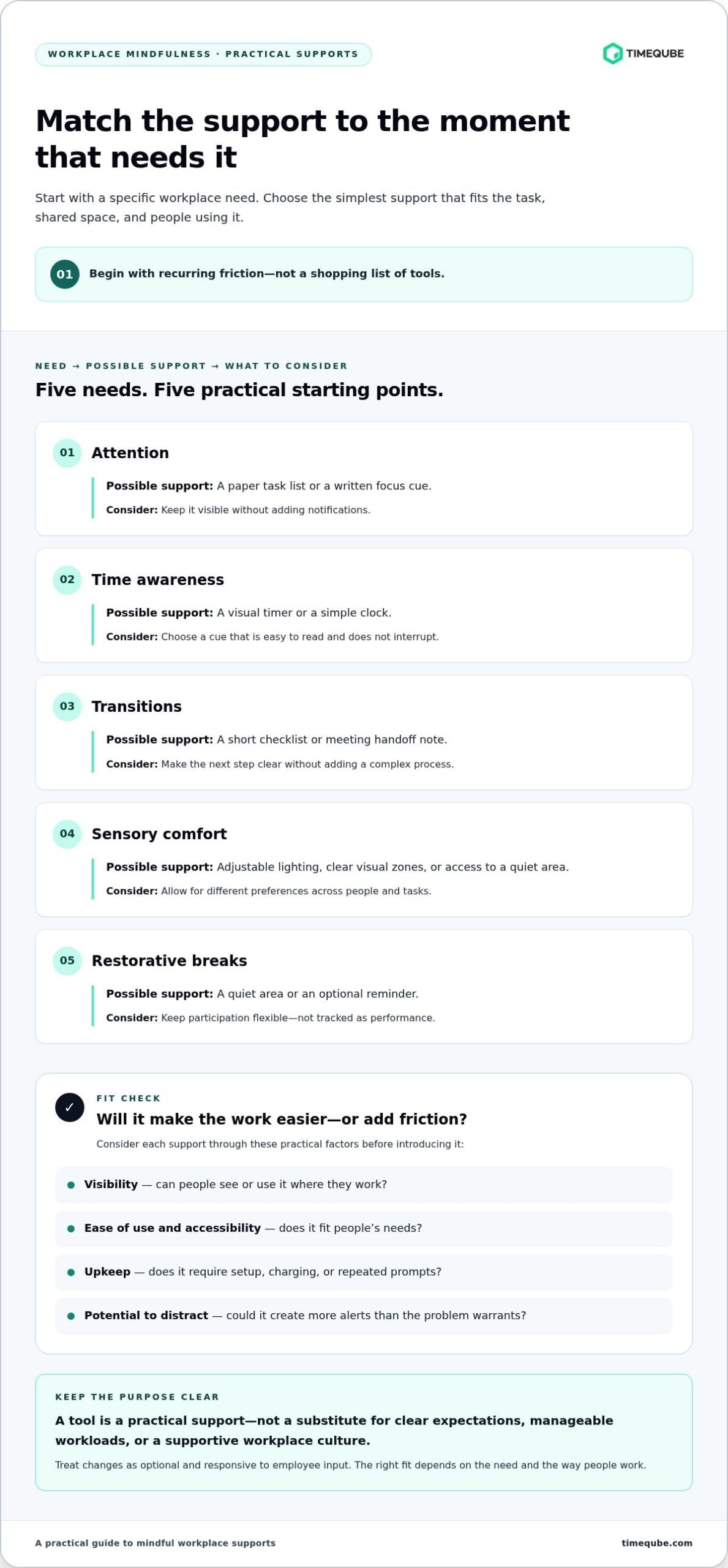
Use this comparison to narrow the options. Treat each as a starting point, not a promise of a particular outcome.
| Need | Possible support | Consider |
|---|---|---|
| Attention | Paper task list or written focus cue | Keep it visible without adding notifications. |
| Time awareness | Visual timer or simple clock | Choose a cue that’s easy to read and doesn’t interrupt. |
| Transitions | Short checklist or meeting handoff note | Make the next step clear without adding a complex process. |
| Sensory comfort | Adjustable lighting, clear visual zones, or quiet access | Allow for different preferences across people and tasks. |
| Restorative breaks | Quiet area or optional reminder | Keep participation flexible, not tracked as performance. |
Which tools can support attention and time awareness?
A visual timer can make elapsed time easier to notice without a phone notification. For example, a physical timer with color-coded light signals offers a shared visual cue during a meeting. For individual work, a paper task list or a brief written cue, such as “finish the draft,” may be enough. For a deeper look at this use case, see the article on using a visual timer for deep work.
Compare options by visibility, ease of use, accessibility, maintenance, and potential to distract. Can people see or use the cue from where they work? Does it require setup, charging, or repeated prompts? A tool that creates more alerts or upkeep than the problem warrants may add friction instead of reducing it.
Which environmental tools can support a calmer workspace?
Lighting adjustments, clearly marked quiet and collaborative zones, and access to a low-noise area can help shape the feel of a workspace. Needs differ: a sound that fades into the background for one person may disrupt another, and preferences for light and temperature also vary. Avoid assuming one setting will suit everyone. For practical guidance on ambient light for focus and visual comfort, consider how general and task lighting affect glare and comfort.
Test small, reversible changes before making a broad recommendation. Invite employees to share what feels useful, then adapt the setup to actual tasks and shared-space needs. For a visible, screen-free time cue in meetings, Timeqube visual timers for business meetings offer a physical option.
How to introduce mindful workplace tools without creating resistance
A tool is more likely to feel useful when it responds to a friction employees recognize. Introduce tools for a mindful workplace as a small, optional experiment, not a new standard for how everyone should work. Be clear about the purpose and reassure the team that participation won’t be used to monitor individual performance.
A simple rollout can keep the process respectful and practical:
- Identify one friction. Notice a recurring issue, such as rushed meeting handoffs or difficulty finding a quiet place to focus.
- Invite input. Ask the people affected what would make that moment easier, and listen for differing needs.
- Test one change. Keep the trial voluntary and limited to a clear use case.
- Review the experience. Gather feedback on usefulness, accessibility, and any unwanted distraction.
- Adapt or stop. Keep what serves the team. Change or remove what doesn’t.
This sequence shifts the conversation from “Which tool should we adopt?” to “What friction are we trying to reduce?” It also makes room for a tool to help some employees while being unnecessary for others.
How should a team test a new workplace tool?
Choose one defined use, such as making meeting transitions clearer or offering a visual time cue during shared discussions. Explain how the tool works, what it is meant to support, and who can choose to take part. Invite feedback in a low-pressure way, such as a short check-in or private response option. Before expanding the trial, consider whether the tool was easy to use, accessible, and free from unwanted interruption.
For example, a physical visual timer can provide a shared time cue without adding a phone notification. It may suit some meetings, while a written agenda or no additional cue may work better for others. Timeqube’s visual timers for business meetings are one option, not a requirement for every team.
How can managers keep mindful practices inclusive?
Offer alternatives for different sensory preferences, communication styles, and work patterns. Don’t require meditation, ask employees to disclose personal wellbeing information, or assume one practice will suit everyone. A quiet area, a written transition cue, or simply the option to step away from a reminder can support different needs. This is especially relevant in inclusive meetings and when adapting time management for neurodiversity: flexibility matters more than uniform participation.
Keep the purpose modest. A trial can show whether a change fits the work, but it can’t guarantee calmer feelings or better performance. Let employees opt in, opt out, and help shape what happens next.
How to build mindful routines around tools, not dependence on them
A routine works best when it helps someone notice a transition, then fades into the background. Tools for a mindful workplace can offer a cue to pause, begin a task, shift into a meeting, or close the workday. They shouldn’t demand constant attention or become another standard employees feel they must meet.
For example, before moving from one task to the next, an employee might glance at a written note, notice what remains unfinished, and choose a clear first step for the new task. A quiet moment or visual cue could help mark that shift, if it suits the person and setting. This is an illustrative routine, not a clinical intervention or universal schedule. It doesn’t replace reasonable breaks, manageable workloads, or clear boundaries around work.
What does a mindful workday transition look like?
Keep the transition simple: acknowledge the task you’re leaving, then set an intention for the next one. That intention could be as practical as “review the agenda” or “finish the opening paragraph.” Use a visible cue, a written note, or a brief quiet moment only if it feels helpful. If a routine becomes disruptive or hard to maintain, adapt it or let it go.
For a meeting, a visual time cue can help participants notice how time is passing without relying on a screen notification. A physical timer is one option, not a signal to rush or a substitute for a break. Timeqube’s visual timers for professional meetings can support shared time awareness.
How can a team review whether a routine is useful?
Ask employees whether the routine feels clear, optional, accessible, and easy to maintain. Invite specific observations: Was the cue easy to notice? Did it interrupt the task? Could people choose another approach? Use these responses to adjust the routine rather than treating participation or output as proof that it worked.
Keep the practice flexible. Someone may prefer a written cue, while another person may find no cue necessary. A useful routine supports a deliberate choice, then leaves attention free for the work itself.
If staying present in long meetings is the need, consider whether a visual timer for professional meetings fits your setting.
Where a visual timer fits among tools for a mindful workplace
A visual timer is one possible support for shared time awareness. It won’t make a workplace mindful on its own, and it won’t suit every task or person. Its role is narrower: make the passage of time visible so people can orient themselves without relying on a digital notification.
Timeqube is a physical timer that uses color-coded light signals. In a meeting, the visual cue can sit alongside a clear agenda and agreed expectations about timing. For an individual focus period, someone might choose a visible cue if it helps them stay aware of time. A clock, written note, or no added tool may fit better. The useful choice depends on the setting.
When might a physical visual timer be useful at work?
Consider one when a group wants a shared, screen-free time reference, such as during a discussion with several agenda items. Before using it, agree on its purpose. It can help participants notice time passing, not pressure a speaker to stop abruptly or judge anyone’s contribution. Clear expectations make the cue easier to interpret and less likely to feel controlling.
Physical and app-based tools offer different formats. An app may suit someone who prefers a personal digital cue; a physical timer offers a visible signal without requiring a software notification. Neither is inherently more effective. Accessibility, workspace layout, and individual preference should guide the decision. For a meeting-focused option, explore Timeqube timers for business meetings.
How can a visual cue complement other mindful workplace tools?
A timer can work alongside, not instead of, the practices around it. A team might set a meeting intention, use the cue to stay aware of shared time, then leave a moment to identify the next step. Individuals can adapt that pattern with a written prompt or a quiet pause. Keep the cue optional, and don’t let it replace reasonable breaks, workload boundaries, or room for a conversation to continue when needed.
Timeqube also makes physical timers for mind and body therapies, a different context where time awareness can be part of a guided session. That distinction matters: a tool’s design and role should fit the activity, rather than being treated as a universal mindfulness solution. Choose a visual timer only if it addresses a real need, then invite feedback and adjust its use.
Make room for a calmer way of working
The most useful tools for a mindful workplace address a real point of friction without adding pressure. Start by listening to employees, choose a simple support for a specific need, and adapt it when it doesn’t fit. Keep routines optional and flexible. A tool can prompt awareness, but it can’t replace reasonable workloads, clear expectations, or a supportive workplace culture.
For shared time awareness, a physical visual timer is one option. Timeqube uses color-coded light signals to show elapsed time without a screen-based notification. Dedicated options support business meetings, and timers can be customized with a company logo. The right choice depends on the work setting and the people using it.
Consider whether a visual cue could make time easier to notice in your meetings or work routines. Explore Timeqube visual timers for mindful work and meetings and find a screen-free time cue for your setting. Small, thoughtful adjustments can help make more space for attention and presence throughout the workday.
Frequently Asked Questions
What are the best tools for a mindful workplace?
The best tools for a mindful workplace address a real need without adding unnecessary friction. A paper task list can support attention, a quiet area can offer a change of setting, and a visual timer can make time easier to notice. Choose based on the task, workspace, accessibility, and employee preferences. No single tool suits everyone, and tools can’t replace fair workloads, clear expectations, or a supportive culture.
How can I make my workplace more mindful?
Start by asking employees which parts of the workday feel most fragmented. Then test one small, optional change, such as making meeting transitions clearer or creating access to a quieter work area. Invite feedback about what helps and what gets in the way. Keep the approach flexible, and address underlying issues such as unclear priorities or excessive demands rather than expecting tools alone to change workplace conditions.
Are mindfulness apps enough to create a mindful workplace?
No. An app may offer guided practices or reminders for people who choose to use them, but it can’t shape every part of a shared work environment. Frequent notifications may also feel like another interruption. Consider apps alongside practical changes to routines, sensory conditions, and work expectations. Participation should remain voluntary, and employees shouldn’t be asked to disclose personal wellbeing information to prove that a tool is useful.
How can a visual timer help at work?
A visual timer can make elapsed time easier to notice through a visible cue, rather than a phone notification. Timeqube is a physical timer that uses color-coded light signals, with options for business meetings and mind/body therapies. In a meeting, teams can agree that the cue supports shared time awareness, not pressure or performance monitoring. A written agenda, clock, or no timer may be a better fit in some settings.
What is the simplest way to start a mindful work routine?
Choose one transition that already happens in your day, such as moving from a meeting to a task. Pause briefly to notice what you’re leaving behind, then identify one clear next step. Use a written note or another cue only if it helps. Keep the routine optional and adaptable. It shouldn’t replace reasonable breaks, manageable workloads, or boundaries around working time.
Can workplace tools reduce stress for employees?
Workplace tools may make certain moments easier to manage, but no single tool can guarantee lower stress. A clearer transition cue or access to a quieter area may address a specific source of friction. Broader causes, such as unrealistic workloads, unclear roles, or unsupportive norms, call for organizational changes. Ask employees what they find useful, and review their feedback without treating participation as a measure of wellbeing.