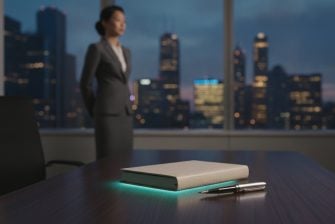

What if the light meant to help you focus is adding glare or visual strain? Ambient light for focus isn’t about making a workspace brighter at any cost. The goal is comfortable visibility: enough general light to see the room and your work, without reflections, harsh contrasts, or a bright source catching your eye.
Start by identifying the job each light needs to do. Ambient lighting illuminates the room; task lighting supports close work. Neither needs to act as a timer or a prompt to keep working. If a page is hard to read, the light on that page may need attention. If the whole room feels dim, consider its general illumination instead.
This guide explains how to assess visual comfort, reduce glare, and make measured changes that suit your work and space. It also clarifies when a separate, subtle visual time cue may help. A physical visual timer, such as Timeqube, uses color-coded signals to make time visible without a phone notification. It complements workspace lighting rather than replacing it.
Key Takeaways
- Use ambient light for focus to make the workspace comfortably visible, not simply brighter.
- Separate room-wide illumination from task lighting, screen adjustments, and visual time cues.
- Notice glare or discomfort, change one lighting factor, then reassess during your usual work.
- Choose adjustments that suit your tasks and room rather than relying on a universal setting.
- A physical visual timer can add a separate, color-coded time cue without phone notifications.
What Does Ambient Light for Focus Mean in a Workspace?
Here, “ambient light for focus” means lighting in a workspace, not interior accessories for a Ford Focus vehicle. Ambient light is the general illumination that makes a room and its contents visible. It provides the background light in which you work, move, and look at a screen. The term describes the lighting environment, not a method that guarantees better concentration.
In practice, ambient lighting helps you see the room as a whole. It might come from a ceiling fixture, daylight through a window, or light reflected around the room. The overview of lighting describes how general, task, and accent lighting serve different purposes. Distinguishing those roles makes it easier to identify what needs adjusting. For example, if the room feels dim but a desk lamp makes one small area bright, the issue may be the overall light distribution rather than the lamp’s position.
Ambient lighting, task lighting, and visual cues are different
Ambient lighting illuminates the room as a whole. Task lighting directs light toward a specific activity, such as reading a document, writing by hand, or examining detailed work. A desk lamp is a common example. A visual time cue has a different function: it signals that time is passing or a time boundary is approaching. It doesn’t illuminate the room for work.
A physical visual timer such as Timeqube uses color-coded light signals to make time perceptible. That signal is separate from the workspace’s ambient lighting. For example, a room can have comfortable, steady illumination while a timer provides a distinct cue during a therapy session or business meeting. One supports visibility; the other communicates time without relying on a phone notification.
Why light can matter to a focused work environment
Light affects what you can see and how the surrounding space feels to look at. Uneven illumination, reflections on a screen, or a bright fixture in your line of sight may feel uncomfortable. These are useful observations when assessing a workspace, but they don’t establish that a particular light setting will improve concentration. Lighting is one part of the environment, not a guaranteed focus solution.
The suitable balance depends on the work and the person. Reading printed pages may call for useful light near the document, while screen-based work can make reflections or a strong contrast between the display and the room more noticeable. Detailed handwork may call for another arrangement. Preferences for warm or cool light also vary, so color alone isn’t a universal guide to attention.
Start with what you can observe: Is the whole room easy to see? Is the work surface clear? Do you notice glare, shadows, or a distracting light source? These questions define the practical role of ambient light for focus. They help you distinguish a lighting issue from the separate question of whether a visible time cue would be useful.
How Ambient Light Shapes Visual Comfort and Attention
Light shapes the visual conditions of work: what stands out, what is easy to read, and whether reflections or strong contrasts catch your eye. That matters when assessing a workspace, but it isn’t proof that a particular setup will improve productivity. Ambient light for focus is best approached as an environmental comfort question, not a guaranteed performance technique.
Visual comfort describes how an environment feels to look at; measured work performance describes what a person accomplishes. The two may be related in some situations, but comfort alone cannot establish a productivity effect.
Brightness, glare, and contrast in the work area
Illuminance describes how much light falls on a surface, such as a desk or printed page. It’s commonly measured in lux. A dim work surface can make details harder to see, while intense or uneven light may feel uncomfortable. There isn’t one appropriate level for every room and task, so use your actual work as a guide rather than aiming for a universal number.
Check for reflections on your monitor, glossy desk, or document. A window or bare fixture in your line of sight can create glare, while a very bright screen against a dark room can feel visually stark. Try changing the screen angle, adjusting a blind, or repositioning a lamp. Make one change at a time, then notice whether text, documents, or the surrounding area feel easier to see.
Color temperature and changing work conditions
Color temperature, expressed in kelvins, describes the appearance of white light. Lower values tend to look warmer, with a more yellow tone; higher values tend to look cooler or bluer. The label describes appearance, not the physical temperature of the bulb. Neither warm nor cool light is a universal focus setting.
Daylight changes over the day, and a workspace’s orientation, schedule, task, and the individual’s preferences can shape what feels comfortable. Someone reading paper may prefer a different balance from someone working mainly on a screen. Treat color adjustments as a personal environmental choice. A preferred color temperature doesn’t, by itself, show that attention will improve.
Assess the setup during your normal work rather than judging it once in isolation. Note when glare appears, whether details are easy to see, and whether changing daylight alters the room. Then adjust one element and reassess. This measured approach can help you find a practical comfort improvement without assuming that brighter, cooler, or more dramatic lighting will make everyone more attentive.
If you use a separate time cue during work or meetings, keep its purpose distinct from room illumination. A physical visual timer for business meetings provides a visible time signal; it doesn’t replace a comfortable lighting setup.
Ambient Lighting vs. Task Lights and Visual Timers
Choose an adjustment based on the problem. If the whole room feels dim, a brighter desk lamp may only light one small area. If a page is hard to read, changing the room’s general illumination may be less direct than bringing light closer to the work. If the challenge is keeping track of time, neither lighting choice provides a time boundary.
| Option | Purpose | Placement | Suitable use |
|---|---|---|---|
| Ambient lighting | Illuminates the room overall | Across the room, often from ceiling fixtures or reflected light | When general visibility feels dim or uneven |
| Task lamp | Directs light toward a specific activity | Near the desk, page, or work surface | Reading, writing, or close visual work |
| Screen settings | Adjusts the display’s brightness or appearance | On the device itself | When the screen feels too bright or difficult to view |
| Physical visual timer | Makes a time boundary visible | Where it can be seen during the activity | When a non-digital cue for time passing is useful |
When ambient light is the relevant adjustment
Consider ambient lighting when the room as a whole feels too dim, uneven, or visually harsh. General illumination spreads through the environment, unlike a task lamp that concentrates light on a limited area. You don’t need decorative colored lighting to create a workspace for focus. First assess whether you can comfortably see around the room and between your work surface and screen. If one area is much brighter than the rest, consider whether the light can be distributed more evenly.
When a task light or visual timer fits better
For small print, handwritten notes, or detailed work, a task lamp can direct light where it’s needed without changing the entire room. Screen settings address the display itself. A physical visual timer serves another purpose: its color-coded signal makes time passing perceptible without a digital countdown. It communicates a time boundary, but doesn’t illuminate the room.
These tools can work alongside one another because they address separate needs. A comfortable level of ambient light for focus supports general visibility; a task lamp adds localized illumination; screen adjustments change the display; and a timer provides a visible time cue. If you’re exploring how a cue can support a work session, this visual timer for deep work guide offers more context.
Keep the distinction practical. If a document is hard to see, examine the light on the page. If the whole room feels uncomfortable, consider the ambient setup. If you lose track of a session’s time boundary, a separate visual cue may be more relevant than changing the lighting. A physical visual timer for work sessions can make that boundary visible without turning room lighting into a timer.
How to Adjust Workspace Lighting Without Adding Distraction
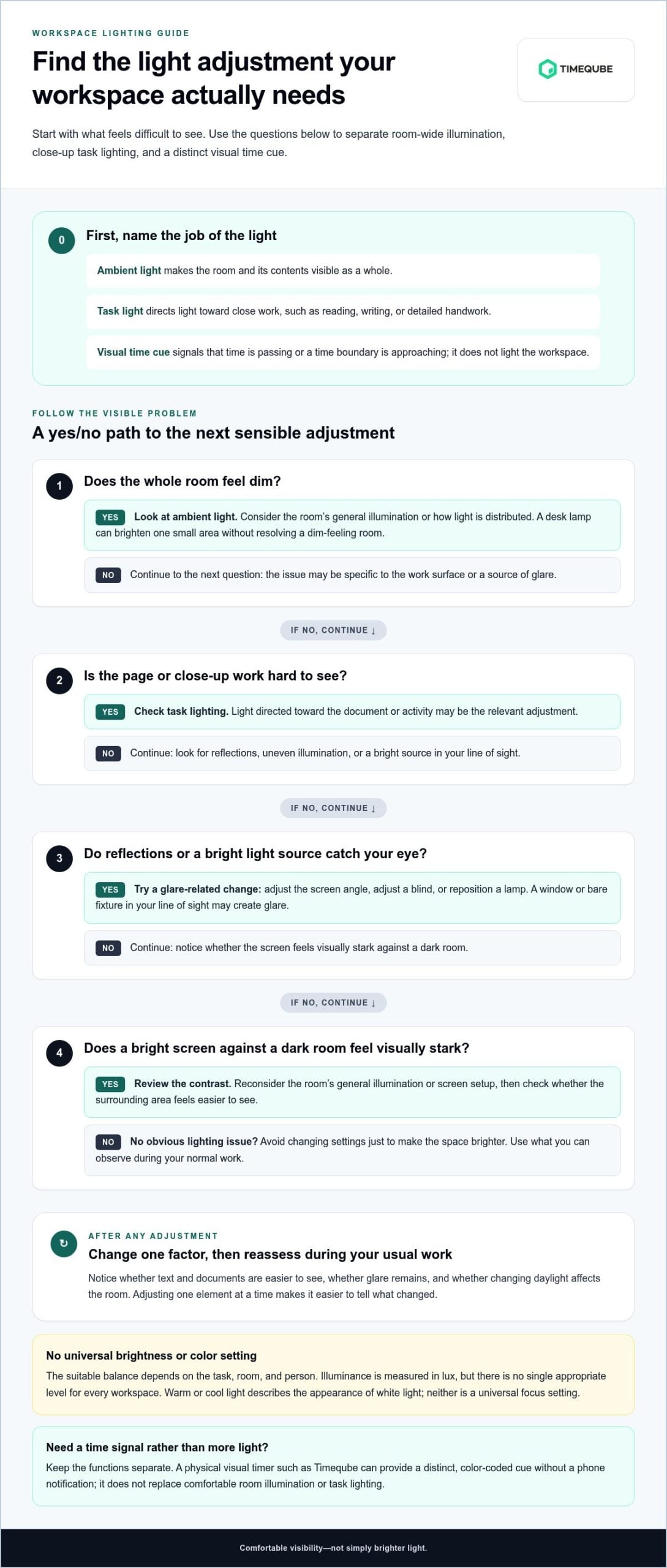
Make lighting changes like a small experiment, not a full workspace redesign. Begin by noticing what feels uncomfortable during ordinary work. Is the desk too dim for reading? Does daylight create screen glare? Is one part of the room much brighter than another? A clear observation gives you a specific issue to address and helps avoid unnecessary changes to the whole setup.
A simple sequence for testing a lighting change
Use this sequence to make adjustments deliberate and easy to assess:
- Observe: Note your task, the time of day, and the current lighting. Look for glare, reflections on the screen or glossy surfaces, uneven light, and changes as daylight shifts.
- Identify discomfort: Describe what you notice. For example, a window reflection makes text on the monitor hard to see, or the page beside your keyboard feels dim.
- Change one factor: Move the lamp, adjust its brightness, change the screen angle, or partly close a blind. Choose one adjustment that addresses the issue.
- Reassess: Continue with a comparable task and notice whether visibility and comfort have changed.
Changing one variable at a time makes the result easier to interpret. If you move a lamp, change the screen angle, and adjust the blinds all at once, you won’t know which change made the difference.
Keep the setup personal, practical, and low-friction
Test adjustments during the work you actually do. A setup that suits screen-based tasks may not feel right for reading printed pages or writing by hand. In a shared room, consider whether moving a lamp or changing a common light affects someone else. Personal sensitivity matters too: a setting that feels comfortable to one person may feel too bright or distracting to another.
Keep changes steady enough to assess. Rapid color shifts or animated lighting effects can draw attention to the light itself, adding distraction instead of addressing a visibility problem. Start with straightforward options such as redirecting a lamp, reducing a reflection, or controlling incoming daylight. If a change doesn’t help, return to the original setup before testing another factor.
This measured approach is more useful than searching for one universal setting for ambient light for focus. Your task, room, daylight, and comfort all shape what works in practice. For a broader look at calm, low-distraction workspace choices, explore this mindful workplace tools guide.
Lighting supports visibility; a time cue serves a separate purpose. If a visible boundary would help during a work session, explore the physical Timeqube visual timer as a non-digital cue alongside your workspace setup.
Using a Physical Visual Timer Alongside Ambient Light
Workspace lighting and a visual timer may both involve light, but they serve different purposes. Ambient light for focus describes the general illumination around you. A physical visual timer, such as Timeqube, is a separate device that uses color-coded signals to make time perceptible. It doesn’t light the room or change its brightness.
What a light-based visual timer adds to the environment
A visible color signal can show that a set period is passing without asking you to check a phone screen or digital countdown. The timer communicates duration; room lighting supports visibility. They can sit in the same workspace without being interchangeable. One provides a time cue, while the other shapes the overall lighting environment.
Another object in view could become a distraction, so placement matters. Put the timer somewhere you can see when you need the cue, without placing it directly in front of your main work or among items that already compete for attention. Use it when a time boundary is useful rather than treating it as a constant focal point. A color-coded signal can reduce the need for repeated phone checks, but its usefulness depends on the task and the person using it.
The distinction matters. Changing ambient light won’t make elapsed time visible, and a timer won’t resolve a dim desk or screen reflection. When assessing the workspace, consider two separate questions: “Can I see my work comfortably?” and “Would a visible cue help me keep track of this session?”
Where this approach may fit
A physical visual timer may suit settings where time boundaries are helpful, including therapy sessions and business meetings. In a therapy context, the Timeqube Mind visual timer offers a color-coded, non-digital time cue. In a meeting, a visible signal can make the passing of time easier to notice without introducing a phone notification. Neither use depends on changing the room’s lighting.
Keep the cue simple. Place it where the relevant people can see it, and let the surrounding illumination remain suited to the room and activity. If the timer draws attention away from the task, try a less prominent position or reserve it for moments when a time boundary matters. A visual cue communicates time; it isn’t a promise of improved concentration for everyone.
For a calm workspace, make lighting decisions based on visibility and comfort first. Then decide whether a separate time signal would be useful for a session or meeting. The physical Timeqube timer offers a distinct, light-based way to make time visible.
Make One Considered Change to Your Workspace
Let comfort guide your next step. Choose one lighting adjustment that addresses a real point of friction, then keep it long enough to notice how it feels during your usual work. There’s no need to chase an ideal setup or add effects that compete for attention. A steady, considered environment can leave more room for the task itself.
If you also want time to be visible, treat that as a separate choice. Timeqube is a physical timer designed for mind and body therapy sessions and professional business meetings. Its color-coded light signals make time perceptible without relying on a phone screen. It supports time awareness, while your room lighting remains responsible for the visual environment.
Consider whether that kind of cue fits a session or meeting you lead. Explore the physical Timeqube visual timer and decide whether it belongs in your workspace. Small, intentional choices can help create a calmer setting for the work ahead.
Frequently Asked Questions
Does ambient light actually improve focus?
Not as a guaranteed cognitive boost. Ambient light for focus is better understood as part of a workspace’s visual conditions: comfortable visibility may make it easier to work without avoidable visual discomfort, but that doesn’t prove improved performance. Needs vary with the task, room, and person. Notice whether reading or screen work feels comfortable, and watch for glare or sharp contrast.
What is the best lighting color for concentration?
There isn’t one lighting color that’s best for everyone. White-light color temperature describes whether light appears warmer or cooler; decorative colored lighting changes the room’s visible hue. These are different choices, and neither alone guarantees concentration. You might prefer a steady neutral-looking light for paperwork and a different comfortable setting later. Choose based on the task and your preference.
Is ambient lighting the same as task lighting?
No. Ambient lighting supports general visibility around a room, while task lighting directs light toward a particular activity. For instance, general room illumination can be paired with a reading lamp aimed at a page. You may need both, one, or neither adjustment depending on the space and visual task. Judge each by whether it makes the relevant area easier to see without creating unwanted glare or discomfort.
Can colored lights help you focus while working?
Colored light can change the visual character of a workspace, but it shouldn’t be presented as a reliable focus treatment. Before adding it, consider whether the color draws your attention, reflects on a screen, or feels uncomfortable during the task. Also distinguish decorative lighting from a color-coded timer. A timer’s signal represents time passing; it isn’t intended to illuminate the room or make colored room lighting necessary.
How bright should a workspace be for focused work?
There’s no single brightness level that suits every workspace. The useful amount depends on what you’re doing, the room’s existing light, reflections on screens, and your visual comfort. Someone reviewing printed material may assess the page differently from someone working mainly on a monitor. Adjust gradually and notice the result during the task.
Can a visual timer replace ambient lighting?
No. They address different needs. Ambient lighting contributes to general visibility, while a visual timer communicates the passage or allocation of time. You might use a timer to mark a meeting segment while keeping the room lighting suited to participants and materials. Timeqube is a physical visual timer, not an ambient room-lighting product. Its color-coded signals make time visible, so it can complement lighting rather than substitute for it.
How can I make my desk lighting less distracting?
First check whether a lamp or window creates glare on your display, then reposition the light source or screen to reduce the reflection. Prefer steady illumination over changing effects if movement or color shifts keep catching your eye. Make one adjustment at a time and assess it during your usual task, such as reading a document or editing on screen. Removing unnecessary visual movement may make the desk feel calmer, without guaranteeing a measurable concentration gain.