

What if the answer to back-to-back meetings isn’t better stamina, but a better meeting system? When calls leave no room to recover or focus, feeling drained isn’t a personal failing. It’s a signal that the way meetings are scheduled and run may be working against people.
If you’re wondering how to avoid meeting fatigue without sacrificing collaboration or adding another app, start by looking beyond the calendar. Fatigue can build when meetings fragment attention, lack clear agendas, demand sustained video-call focus, or leave too little time between conversations. Some popular fixes address only the symptoms. Changes to meeting structure and shared time boundaries can make a more meaningful difference.
This article separates common myths from useful evidence, explains what can make meetings draining, and offers realistic ways to improve focus and recovery. You’ll also find practical approaches for communicating time boundaries, including low-distraction cues that support awareness without replacing the bigger work of creating healthier schedules.
Key Takeaways
- Notice when meeting-related depletion recurs, and track which conditions make it harder to concentrate or re-engage.
- Understand how attention demands and task-switching can make meetings draining, with different pressures in virtual and in-person settings.
- See why shorter meetings and personal resilience may help in some situations but can’t replace healthier workload design.
- Use a practical sequence to audit, prioritize, prepare for, participate in, and recover from meetings, while identifying where manager support is needed.
- Learn how to avoid meeting fatigue with realistic schedule and meeting changes, plus shared visual time cues that support facilitation without adding screen notifications.
How to avoid meeting fatigue starts with recognizing what is draining you
Meeting fatigue is recurring mental or emotional depletion associated with the demands of attending meetings, especially when they leave too little space to recover or focus on other work. It’s different from feeling tired after one unusually demanding day. Look for a recurring pattern, not a single moment of low energy.
Understanding how to avoid meeting fatigue begins with looking at the conditions around meetings, not judging your ability to cope. Frequency, unclear purpose, limited participation, and a lack of recovery time can combine to make the workday feel fragmented. Video calls may add their own demands, often discussed under the term Zoom fatigue.
For another perspective on the experience and possible ways to respond, watch this video:
What does meeting fatigue feel like?
It can show up in ordinary ways: concentration slips during a discussion, patience feels thinner, or it takes longer to return to a task after a call. These experiences aren’t a diagnosis, and they can have many causes. They’re useful signals to observe, especially if they recur on meeting-heavy days.
Notice when your energy and focus dip. Is it after a particular kind of call, near the end of a long sequence, or when there’s no pause to gather your thoughts? One demanding day may simply require rest. If the pattern keeps recurring, examine the schedule and meeting expectations rather than assuming you need to try harder.
Which meeting patterns can leave people depleted?
Back-to-back calls can squeeze out the transitions people use to shift attention, take notes, or prepare for the next topic. An unclear agenda can leave participants unsure what to contribute. A meeting that ends without decisions or next steps can leave unresolved questions hanging over the rest of the workday.
Participation matters, too. Staying attentive while having little room to speak can be tiring, and frequent shifts between discussions and focused tasks may make it harder to regain momentum. Track which conditions you can change yourself and which need a team conversation. Small adjustments can help, but persistent overload is not simply an individual resilience problem.
Why meetings feel exhausting: attention, context-switching, and recovery
Meetings ask the mind to follow ideas, interpret speech and cues, hold details in memory, and decide when to respond. Cognitive load is the demand placed on working memory as a person processes information and completes a task, a concept developed in John Sweller’s research on cognitive load theory. When discussions move quickly or introduce complex material, that demand may rise. This helps explain why a meeting can feel tiring even when you aren’t speaking throughout.
Format can shape the demands. In-person conversations involve shared space and live social cues. Video calls can bring prolonged close-up gaze, self-view, and reduced movement. Jeremy Bailenson’s 2021 article in Technology, Mind, and Behavior proposes these as possible contributors to video-call fatigue. They’re plausible mechanisms, not proof that everyone will experience the same effect or that virtual meetings are always more draining.
How constant context-switching affects the workday
Switching from a meeting to messages, then to focused work, means reloading what you were doing and deciding what needs attention next. For example, someone might leave a project discussion, answer an urgent chat, and then try to return to a report. That sequence can feel disruptive, though its impact depends on the task, the person, and the interruptions.
Gloria Mark and colleagues’ 2008 study of workplace interruptions found that interrupted workers often resumed their tasks quickly, but experienced more stress, frustration, and time pressure. That finding describes observed effects in the study, not a universal rule for every meeting transition. It also doesn’t establish that a specific meeting pattern causes lasting mental-health effects.
Why breaks and meeting recovery need realistic expectations
A brief pause between calls can create room to note next steps, stretch, or mentally shift gears. It isn’t a guaranteed reset. A short gap may be absorbed by urgent work, and people may need different kinds of transition time. Meeting purpose, workload, accessibility, and the ability to step away all matter. When schedules leave no room to recover, the solution may require team-level changes, not just individual habits.
Time cues can make a meeting’s progress visible and support facilitation without another screen notification. They don’t reduce an overloaded calendar or replace purposeful agendas. For teams considering a physical option, a visual timer for business meetings can serve as a shared cue, not a treatment for fatigue. The science of visual meeting timers offers further context on this approach.
Meeting fatigue myths: what shorter meetings and personal resilience can, and cannot, do
When meetings leave people depleted, the first proposed fix is often to shorten every call or ask individuals to manage their time better. Both can help in the right context, but neither addresses every cause. Meeting fatigue reflects personal experience, but it is also shaped by workload, decision-making habits, and how much control people have over their calendars.
Consider the meeting’s purpose before changing its length. A focused update with a clear agenda may not need a long slot. A complex discussion may need enough time for different people to contribute, ask questions, and reach a shared understanding. Cutting it short without changing the process can simply move the work into follow-up messages or another meeting.
Myth: every meeting should simply be shorter
A tighter agenda can help a group stay on topic and clarify the decision it needs to make. But duration alone doesn’t show whether a meeting is useful. Review its purpose, who needs to attend, and what outcome it should produce. If participation is essential, allow enough space for people to contribute instead of treating the clock as the only measure of efficiency.
| Myth | Reality |
|---|---|
| Shorter meetings always reduce fatigue. | They may sharpen focus, but rushed discussion or unclear follow-up can create more work. |
| People can prevent fatigue through better personal time management. | Individual habits help, but employees may have limited influence over meeting volume, invitations, or priorities. |
| Removing meetings is always the answer. | Some meetings support coordination, shared decisions, and participation. Review their purpose before canceling them. |
| A timer or short break fixes the problem. | These can support time awareness or create a pause, but they can’t correct excessive workload or poor scheduling. |
Myth: meeting fatigue is an individual time-management failure
Someone can protect focus time where they have control, but team expectations matter too. Frequent invitations, unclear decision ownership, and recurring calls without a defined purpose can keep the calendar crowded. That burden shouldn’t be framed as a failure of personal resilience, especially when declining meetings isn’t a realistic option.
Start with changes within reach, such as asking whether an update can be shared asynchronously or clarifying the decision needed before a call. Managers and teams may need to review recurring meetings, attendance, and protected work periods. A visual timer for business meetings can make elapsed time visible as a facilitation cue, but it won’t create focus time by itself. Learning how to avoid meeting fatigue means pairing small tools and personal habits with changes to the conditions that keep meetings draining.
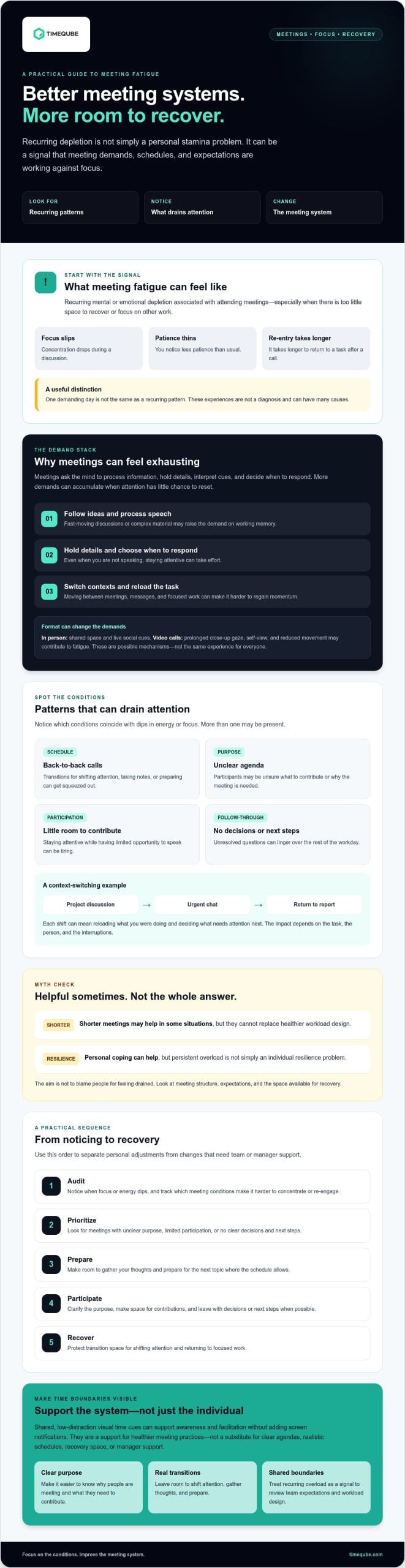
Avoid meeting fatigue with calendar and meeting changes
Reducing meeting strain works best as a sequence, not a single productivity trick. Some adjustments are within your control. Others require managers to change shared expectations, recurring schedules, or decision-making practices. Start with what you can influence, then use what you notice to make a practical case for wider changes.
- 1. Audit: Review your calendar for recurring calls, back-to-back blocks, and meetings that regularly run past their purpose. Note when focus or energy tends to dip, and what those meetings have in common.
- 2. Prioritize: For each meeting, ask whether you need to attend, whether the whole group is necessary, and what decision or contribution is expected. Where appropriate, ask if an update can be shared asynchronously or two related discussions can be combined.
- 3. Prepare: Check for an agenda and clarify what you’re expected to bring. If the purpose is unclear, ask, “What outcome should we leave with?”
- 4. Participate: Focus on the decision or discussion at hand. If you organize the call, make space for relevant participants to contribute and confirm who owns the next step.
- 5. Recover: Where your schedule allows, leave a short buffer to capture actions, reset your attention, or prepare for the next task. Treat it as useful transition space, not a guaranteed cure for fatigue.
What can you change in your own workday?
Protect a focus period when you have calendar control, and use asynchronous updates when a written status is enough. If declining a meeting feels difficult, suggest an alternative rather than simply disappearing: ask whether you can review notes, join only for the relevant agenda item, or contribute beforehand. These options may not fit every role or discussion, so consider what the team needs.
What can teams and managers change?
Review recurring meetings for purpose, necessary participants, and clear decision ownership. Teams can also set predictable gaps between calls and agree on ways for remote and quieter participants to contribute. Check whether changes actually improve people’s experience. A calendar policy may look helpful on paper but fail if workload simply shifts into messages or after-hours work.
Quick checklist: Identify one meeting to question, clarify its intended outcome, protect a focus block where possible, and note whether a transition pause helps you move into the next task.
Shared time cues can support facilitation, but they can’t solve excessive workload or scheduling pressure. If a visible, screen-free cue would suit your meetings, explore Timeqube for business meetings as an optional aid for shared time awareness.
Build calmer meetings with shared time cues, not another productivity promise
A shared visual cue can make elapsed time visible without adding another screen notification. It gives the group a common reference point, so the facilitator doesn’t have to interrupt discussion with repeated verbal time checks. Whether this helps depends on the meeting and the people in it.
A visual time cue supports meeting facilitation by making elapsed time easier to notice, but it cannot treat meeting fatigue or fix excessive meetings and workload. Think of it as one small part of healthier meeting design, not a shortcut around clear purpose, realistic schedules, or recovery time.
When can a visual timer support a less draining meeting?
For an agenda with several topics, an organizer can agree on a time boundary for each item and use a visual cue to help the group notice how the discussion is progressing. A cue near the end can prompt a check-in: Is there a decision to make, an action to record, or a reason to extend this conversation? That keeps time awareness in service of the discussion, rather than making the discussion serve the clock.
Before using a cue, ask participants whether it’s clear and comfortable. Some groups may find it reduces the need for spoken time checks; others may prefer a verbal reminder or no visible timer. Accessibility and individual preferences matter. Make sure the cue isn’t the only way people can understand the meeting’s timing.
How to make time cues supportive rather than pressuring
Explain the cue before the meeting begins. Tell participants what it signals and what it doesn’t. For example, reaching the end of an agenda block can mean “review our progress,” not “stop speaking immediately.” Allow flexibility when a complex topic needs more discussion or someone needs additional processing time. If the group extends a discussion, make that a deliberate choice and consider what will need to move.
A physical visual timer can use color-coded light signals to support shared time awareness without software or screen notifications. It may suit teams that want a low-distraction cue in the room, but it won’t create breaks or protect focus time on its own. To explore this option, see the physical meeting timer. A useful next step is simple: agree on one meeting boundary, explain how you’ll signal it, and ask afterward whether the cue supported the conversation. For a broader view of tools that respect attention rather than compete for it, see humane tech for the workplace.
Make your next meeting more intentional
Learning how to avoid meeting fatigue starts with noticing what drains your attention, then changing the conditions you can influence. Clear purpose, realistic agendas, and room to transition between tasks can make meetings easier to navigate. Shorter calls or personal time-management habits may help, but they can’t replace healthier team expectations when meeting load is excessive.
Choose one practical adjustment to try: clarify the outcome before a call, protect focus time where you can, or ask your team to review a recurring meeting. Shared time cues may also help a group stay aware of an agenda without adding screen notifications. They support facilitation, but they aren’t a remedy for an overloaded schedule.
A physical meeting timer uses color-coded light signals to make elapsed time visible without digital software. If that kind of cue fits your meeting style, consider whether it could support your team’s meeting routine.
Small, considered changes can create more space for focused work and more purposeful collaboration. Start with one, then notice what feels better for your team.
Frequently Asked Questions
How do you avoid meeting fatigue during a full workday?
To understand how to avoid meeting fatigue, start by reviewing where your attention and energy dip, then adjust what you can. Check whether each meeting needs your attendance, clarify the expected outcome, and protect focus periods where your role allows. A short buffer can help you transition between calls and tasks. If you don’t control your calendar, raise recurring scheduling pressure with your manager and suggest one specific change.
What are the common signs of meeting fatigue?
Common experiences include losing focus during calls, feeling more irritable than usual, or finding it difficult to return to a task afterward. These aren’t specific diagnostic symptoms, and they can have many causes. Notice whether they tend to appear after certain meeting patterns, such as a sequence of calls with little transition time. A recurring pattern may be a useful reason to review your schedule and workload.
Do shorter meetings prevent meeting fatigue?
No. Shorter meetings may help a group stay focused when the purpose is clear and the discussion fits the time available. But shortening a complex conversation can limit participation or leave decisions unresolved, creating more follow-up work. Review the meeting’s purpose, attendees, and intended outcome rather than duration alone. A concise update may work asynchronously, while a collaborative decision may need adequate discussion time.
Can breaks between meetings reduce fatigue?
Pauses between meetings can provide time to capture next steps, prepare for the next topic, or shift attention to focused work. They may make transitions feel less abrupt, but their effect varies and they aren’t a guaranteed reset. A break is also less useful if it gets filled with urgent tasks. Consider workload, accessibility, and individual preferences when deciding what kind of transition time is realistic.
How can managers reduce meeting fatigue for their teams?
Managers can review recurring meetings to confirm each has a clear purpose, the right participants, and an identified decision owner. They can also make agendas and expected contributions clear, leave realistic space between calls, and support different ways to participate. Ask employees which meetings are difficult to navigate, then trial targeted changes. Check in afterward to learn whether the changes helped or simply shifted work elsewhere.
Are virtual meetings more tiring than in-person meetings?
Not for everyone. Virtual meetings may involve screen-based demands, such as seeing your own image or interpreting social cues through video. Stanford researcher Jeremy Bailenson has discussed these as possible contributors to video-call fatigue. In-person meetings have different demands, including travel or sharing a physical space. The format, meeting purpose, accessibility needs, and individual preferences all influence how tiring a meeting feels.
Can a visual timer help make meetings less draining?
A visual timer can make elapsed time visible and give a group a shared cue for an agenda item or closing check-in. Timeqube offers physical timers with color-coded light signals, without digital software or screen notifications. Agree on what the cue means and allow discussion to continue when needed. A timer is a facilitation aid, not a treatment for fatigue or a fix for excessive meetings.
If a screen-free, physical time cue fits your meeting style, explore Timeqube’s visual timers for meetings.