
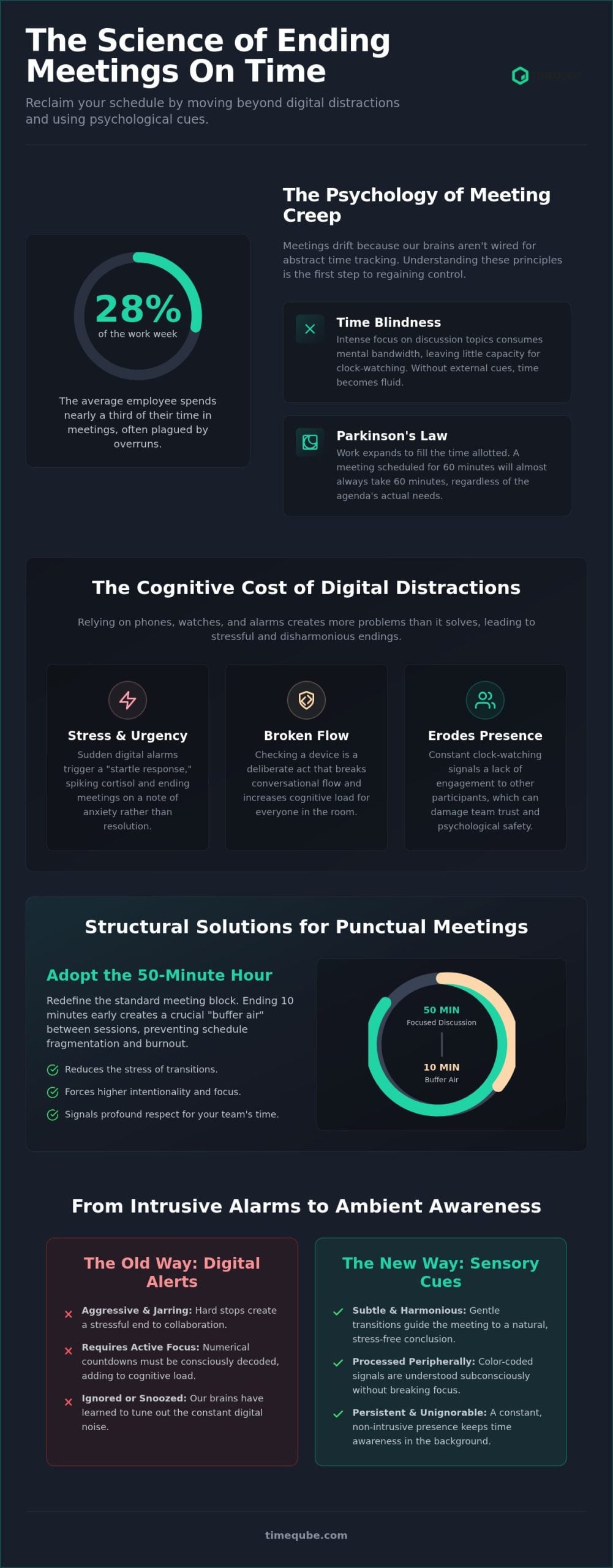
Ending meetings on time isn’t a matter of willpower; it’s a matter of sensory environment design. You likely know the heavy weight of meeting fatigue and the friction of back-to-back schedule conflicts. It’s common to feel that interrupting a tangent is rude, even when productivity is slipping away. Data shows that the average employee spends about 28% of their work week in these sessions. Yet, most teams struggle to stop meetings from going over time because they rely on digital alerts that the brain has learned to ignore.
This guide offers a different path. You’ll discover how to reclaim your schedule by moving beyond digital distractions and using psychological cues to end every meeting on time. We’ll examine how sensory stimuli and peripheral vision can create a stress-free transition between tasks. By understanding how the human brain processes time subconsciously, you can lead sessions that finish five minutes early. This approach reduces the anxiety of transitions and ensures your team remains engaged without the cognitive load of constant clock-watching.
Key Takeaways
- Recognize how Parkinson’s Law drives meeting creep when clear sensory boundaries are absent.
- Adopt the 50-minute rule to build intentional buffer air between sessions for smoother mental transitions.
- Learn how visual stimuli and peripheral vision help you stop meetings from going over time by reducing cognitive load.
- Use scripted exit phrases and a five-minute warning to shift the team’s focus from discussion to clear action items.
- Shift toward hardware-only time management to remove digital friction and maintain professional harmony in every session.
The Psychology of Meeting Creep: Why We Lose Track of Time
Meetings often drift because the human brain lacks an internal stopwatch for abstract professional tasks. While we can sense the passage of hours, the nuances of a thirty minute discussion frequently dissolve into what experts call “time blindness.” In high-stress professional environments, your focus is entirely consumed by the subject matter. This leaves little mental capacity for tracking the clock. To effectively stop meetings from going over time, you must first understand the biological and psychological forces that encourage them to expand.
Without a clear sensory boundary, a meeting has no natural end point. It becomes a fluid event rather than a structured one. This lack of friction allows unproductive tangents to flourish. When the brain isn’t prompted by an external stimulus, it defaults to a state of presence that ignores the schedule. This is why even the most disciplined teams find themselves rushing through critical action items in the final three minutes of an hour-long session.
Parkinson’s Law in the Conference Room
The primary driver of meeting inflation is Parkinson’s Law. This psychological principle states that work expands to fill the time available for its completion. If you schedule sixty minutes for a task that requires only twenty, the discussion will inevitably stretch to fill the full hour. This occurs because the human mind perceives the “available time” as a resource to be used rather than a limit to be respected.
Agendas alone cannot fight this biological tendency toward expansion. A list of topics provides a map, but it doesn’t provide the pace. Many teams attempt timeboxing to impose artificial limits on specific agenda items. However, without a persistent visual cue, the “open-ended” discussion trap remains. The conversation feels important in the moment, causing the group to subconsciously deprioritize the looming end time in favor of immediate engagement.
The Cognitive Cost of Digital Distractions
Monitoring time through digital means creates its own set of problems. Checking a smartphone or a smartwatch is a deliberate act that breaks the flow of conversation. It requires a shift in focus from the speaker to a device, which increases cognitive load. Cognitive load in time-tracking is the mental energy expended to monitor a clock while simultaneously processing complex information. Every time you glance at your watch, you’re briefly abandoning the collaborative space.
- Digital alarms often trigger a “startle response” that creates a spike in cortisol, ending meetings on a note of stress rather than resolution.
- Constant clock-watching signals a lack of presence to other participants, which can erode team trust.
- Numerical countdowns require active decoding, whereas color-coded signals are processed subconsciously by the brain’s peripheral vision.
Relying on loud, intrusive alerts is an aggressive way to manage a schedule. It disrupts the tranquility of a productive session and forces a hard stop that feels jarring. To maintain professional harmony, the transition from discussion to conclusion should be guided by subtle, persistent awareness rather than a sudden digital interruption.
Structural Solutions: Designing a Meeting That Cannot Run Over
Effective time management requires more than intention. It demands a structural framework that enforces boundaries without constant intervention. To stop meetings from going over time, you must design the session’s architecture to account for human behavior. This begins with redefining the standard unit of a professional meeting and establishing strict hygiene before the first participant arrives.
The Power of the 50-Minute Hour
The standard sixty-minute meeting block is a primary cause of schedule fragmentation. When sessions are scheduled back-to-back, there is no time for the brain to reset or for physical transitions between rooms or digital platforms. Adopting a fifty-minute rule creates a ten-minute recovery window. This “buffer air” allows participants to process information, address biological needs, and arrive at their next commitment with presence and focus.
- Ending early signals a profound respect for your team’s mental space.
- A recovery window reduces the stress of transitions, which lowers overall organizational anxiety.
- Shorter durations force a higher degree of intentionality during the discussion.
The average meeting length has decreased to 47 minutes in 2026, reflecting a global shift toward these shorter, more efficient sessions. This trend highlights the growing recognition that the final ten minutes of an hour-long meeting are often the least productive. By formalizing this shorter block, you align your team’s schedule with modern productivity standards.
Agenda Hard-Stops and Speaker Time-Limits
A list of topics is insufficient if those topics lack specific duration limits. Every agenda item should have a dedicated minute count. When a topic exceeds its limit, use the “Parking Lot” technique. This involves documenting the unresolved tangent for later discussion, ensuring it doesn’t derail the current session. Participants must understand the “Hard Stop” time before the meeting starts to align their contributions with the available window.
While assigning a human “Time Keeper” is a common practice, it often introduces social friction. Interrupting a senior leader or a passionate colleague can feel confrontational. Automated, visual systems remove this interpersonal tension by providing objective, neutral signals. For those seeking to implement these boundaries seamlessly, Timeqube for Business Meetings offers a sophisticated way to maintain pace without verbal interruptions.
Finally, implement a “No Agenda, No Meeting” policy. This ensures that every gathering has a defined purpose and a clear path toward resolution. If the goals aren’t articulated in advance, the meeting is likely to drift into unproductive territory. By combining pre-meeting hygiene with a hard-stop philosophy, you create an environment where punctuality is a universal psychological fact rather than a sporadic effort.
Sensory-First Time Management: Using Visual Cues to Stay on Track
Traditional time management relies on active monitoring, which is mentally taxing. To stop meetings from going over time, you must shift from active tracking to passive awareness. This is achieved through sensory-first design. By using visual stimuli that the brain processes subconsciously, you remove the friction of constant clock-watching. Discipline is fragile. Biology is consistent.
The human brain is wired to prioritize color over numerical data. While reading a digital clock requires the prefrontal cortex to decode symbols, color is processed by the visual cortex almost instantaneously. This is a fundamental principle in the science of the professional meeting timer. When time is represented as a shifting hue, it becomes an ambient part of the environment rather than a distraction. You don’t need to stop thinking to know how much time is left.
Why Visual Cues Beat Digital Countdown Clocks
Digital countdowns are aggressive. They create a “ticking clock” pressure that can stifle creativity and increase cortisol levels. When participants are forced to look at a screen or a watch, they break eye contact and lose the flow of conversation. Visual cues, however, leverage peripheral vision. This allows every person in the room to maintain their presence while staying aware of the remaining time. It’s a more sophisticated way to stay on schedule.
- Ambient light creates a shared group consciousness, ensuring everyone is on the same page without a word being said.
- It eliminates the need for a moderator to play the role of the “time police,” which preserves team dynamics.
- Subconscious processing reduces cognitive load, leaving more mental energy for the actual work at hand.
Implementing a Sensory Time Boundary
The most effective way to utilize these cues is through a Green-Yellow-Red framework. Green represents the flow state where ideas move freely. Yellow provides a gentle, non-verbal signal that the meeting is entering its final phase. Red serves as the final boundary. Because this transition is gradual and visual, it prevents the “rude” feeling of suddenly interrupting a speaker. The light does the work for you.
Positioning is critical for success. A visual timer should be in the line of sight for all participants but remain unobtrusive. It shouldn’t demand focus; it should simply exist as a tranquil partner in the background. By the time the light turns red, the group has already subconsciously prepared for the conclusion. This natural rhythm ensures that sessions end with professional harmony rather than a frantic scramble. You’ll find that your team naturally begins to wrap up their thoughts as the environment changes color.
Practical Techniques to Halt a Meeting in Progress
Managing a meeting requires active intervention when discussions drift. To stop meetings from going over time, you must possess a toolkit of specific protocols that signal the conclusion. These techniques are designed to respect the mental space of every participant while ensuring that the session’s objectives are met. Punctuality is a form of professional courtesy that preserves the integrity of the collective schedule.
The 5-Minute Action Item Protocol
The final five minutes of any session must be reserved for resolution. At this stage, all new discussion should cease. The focus shifts entirely to summarizing next steps, assigning owners, and confirming deadlines. This protocol prevents the common error of ending a meeting without clear direction, which often leads to follow-up sessions that could have been avoided.
- Cease discussion exactly five minutes before the scheduled end.
- Verbalize action items and their respective owners immediately.
- Verify the next meeting date before the clock hits zero.
This transition is more effective when supported by a visual timer for deep work or group collaboration. It provides a neutral, objective signal that the time for exploration has passed and the time for execution has begun. When the environment changes, the group naturally shifts its focus toward closure.
Parking Lotting: Moving Tangents to the Next Sync
Tangents are often valuable, but they shouldn’t derail the current timebox. Validate the contribution by placing it in a “Parking Lot.” This is a physical or digital board where off-topic ideas are stored for later review. It ensures the speaker feels heard without compromising the meeting’s efficiency. Every item in the Parking Lot must be included in the meeting minutes to ensure accountability and future resolution.
If a conversation requires immediate continuity but the room must be vacated, suggest a “Walk and Talk” transition. This allows the primary stakeholders to continue the dialogue while moving toward their next destination. For those looking to implement these boundaries with minimalist elegance, Timeqube for Business Meetings provides the perfect sensory signal to initiate these exits without verbal friction.
Scripting your exit is equally vital. Use polite, declarative phrases such as, “In the interest of everyone’s schedule, let’s move this to the Parking Lot,” or “We have reached our hard stop; let’s finalize action items.” These scripts remove the “rude” feeling of interrupting someone by framing the end as a shared commitment to productivity. By using consistent language, you build a culture where ending on time is a universal expectation.
Transforming Meeting Culture with Timeqube
Meeting culture is often defined by a frantic rush toward the clock. By introducing a physical, sensory-focused tool, you shift the room’s energy from reactive to intentional. Timeqube serves as a tranquil, professional partner in this transition. Unlike digital alerts that demand active attention, this hardware-only solution uses ambient light to guide the group toward a natural conclusion. It is a sophisticated way to stop meetings from going over time while preserving the mental well-being of every participant. The presence of a dedicated physical object creates a shared sense of presence that software cannot replicate.
The shift from a software-dependent environment to a hardware-focused one is essential for deep collaboration. Digital tools often introduce the very distractions they claim to solve. A physical timer remains present without being intrusive. It removes the friction of task-switching and allows the brain to remain in a flow state. By prioritizing sensory stimuli over numerical countdowns, you create a workspace that respects the biological limitations of the human brain. This intentional design is the most effective way to stop meetings from going over time while maintaining a calm, productive atmosphere.
A Tranquil Approach to Meeting Boundaries
The minimalist design of Timeqube complements modern executive offices, acting as an unobtrusive ally rather than a disruptive tool. It signals a profound commitment to team well-being by removing the anxiety associated with sudden, loud alarms. As one of the premier Executive Office Productivity Tools, it fosters an environment of professional harmony. The presence of a physical object dedicated to time awareness creates a shared psychological fact: time is a respected resource. This hardware-only focus ensures zero digital distractions, allowing the team to remain fully engaged in the conversation until the very end.
Branding Productivity for Your Organization
Scaling visual time management across multiple meeting rooms ensures a consistent standard of efficiency throughout the organization. Branded Timequbes allow you to integrate your corporate logo into the very fabric of your productivity strategy. This customization reinforces a brand identity that values presence, focus, and punctuality. It also serves as a high-end corporate gift that provides tangible value, moving beyond traditional promotional items to offer a scientific solution to modern distractions. When every meeting room features a Timeqube for Business Meetings, the organization adopts a universal language of time that is both silent and authoritative.
Reclaiming Your Organizational Rhythm
Punctuality is not merely a matter of discipline; it’s a result of intentional environmental design. By moving away from aggressive digital alerts and toward subtle sensory cues, you respect the biological limitations of the human brain. You’ve learned that structural changes, such as the 50-minute rule and the 5-minute action protocol, provide the necessary framework for focus. These methods allow you to stop meetings from going over time without the friction of verbal interruptions or social anxiety.
A hardware-only approach ensures that your team remains present and engaged. Stress-free visual signals reduce cognitive load, allowing participants to process time subconsciously. This removal of digital distractions creates a workspace defined by professional harmony rather than frantic transitions. When your environment supports your goals, productivity becomes a natural state rather than a forced effort.
Discover how Timeqube can transform your meeting culture and bring scientific precision to your daily schedule. Your team deserves a workspace where time is a partner, not a source of stress.
Frequently Asked Questions
How do I stop a meeting from going over without being rude?
You can stop a meeting without being rude by utilizing a neutral, non-verbal signal. When you rely on a visual cue rather than a verbal interruption, the responsibility for ending the session shifts from the moderator to the environment. This approach respects the speaker’s flow while providing a clear boundary. It removes the social friction and the “rude” feeling of cutting someone off, allowing for a more professional and tranquil transition.
What is the best way to keep a meeting on track?
The most effective way to keep a meeting on track is to combine strict timeboxing with persistent visual reminders. Assigning specific durations to each agenda item prevents early topics from consuming the entire hour. By using a peripheral sensory signal, every participant remains subconsciously aware of the remaining time. This shared awareness ensures the group naturally moves toward a conclusion, helping you stop meetings from going over time without constant verbal prompts.
Why do meetings always run over their scheduled time?
Meetings often run over because of Parkinson’s Law, which states that work expands to fill the available time. Without a clear sensory boundary, discussions become fluid and lack a natural end point. Additionally, the cognitive load required to check a digital clock often leads participants to ignore the time entirely. When there is no ambient signal to trigger a wrap-up, the group stays in a state of presence that disregards the schedule.
Can a visual timer really improve meeting productivity?
A visual timer significantly improves productivity by reducing the mental energy spent on time-tracking. Unlike digital countdowns, which demand active focus, color-coded cues are processed by the brain’s peripheral vision. This allows participants to stay fully engaged in the conversation while maintaining a subconscious awareness of the deadline. Research into cognitive load suggests that removing digital friction leads to higher team engagement and clearer boundaries during professional transitions.
What should I do if a senior executive keeps talking past the end time?
When a senior executive continues past the end time, an objective hardware signal acts as a neutral moderator. It removes the interpersonal tension of a direct interruption. You might say, “The light has turned red, so let’s finalize the action items to respect everyone’s next commitment.” This frames the conclusion as a response to an environmental fact rather than a personal challenge, preserving professional harmony while maintaining strict schedule boundaries.
Is it better to use a digital timer or a physical timer for meetings?
Managing meeting creep in hybrid settings requires a visual cue that is visible to both in-person and remote participants. Placing a physical timer within the camera’s field of view ensures that everyone shares the same sensory environment. This creates a unified group consciousness regarding the schedule. It prevents the fragmentation that often occurs when remote participants are disconnected from the room’s physical pace, ensuring a synchronized and professional conclusion for all.
What are the best phrases to end a meeting on time?
Effective phrases to end a meeting include:
- “We have reached our hard stop; let’s confirm the action items.”
- “In the interest of everyone’s schedule, let’s move this tangent to the parking lot.”
- “Our time is concluding; who is the owner for this next step?”
These scripts validate the discussion while firmly asserting the boundary. They transition the group from exploration to execution with clinical precision and professional courtesy.