
What if the most effective way to improve your team’s focus is to stop adding new software to their workflow? You’ve likely felt the exhaustion of notification fatigue during a session that should have been productive. It’s a common struggle for managers to see engagement drop when team members start checking phones or responding to instant messages. We understand that true leadership requires a space where presence is the priority and digital noise is silenced.
This roundup reveals the best distraction-free meeting tools for 2026 that prioritize human psychology over digital complexity. You’ll learn how to reclaim your time and ensure meetings end five minutes early by using tools that leverage subconscious awareness. We’ll explore how physical, minimalist solutions like the Timeqube for Business Meetings can reduce stress for facilitators and restore eye contact among your team. It’s time to move beyond the friction of apps and return to a more intentional way of working together.
Key Takeaways
- Understand the psychological impact of attention residue and cognitive load in modern professional environments.
- Discover how physical cues engage peripheral vision to manage time without requiring active focus.
- Compare the leading distraction-free meeting tools for 2026 designed to remove digital friction and noise.
- Learn practical strategies to introduce a sensory-first culture to your management routine.
- Improve team engagement and morale by prioritizing human psychology over intrusive software alerts.
The Crisis of Cognitive Load in Modern Management
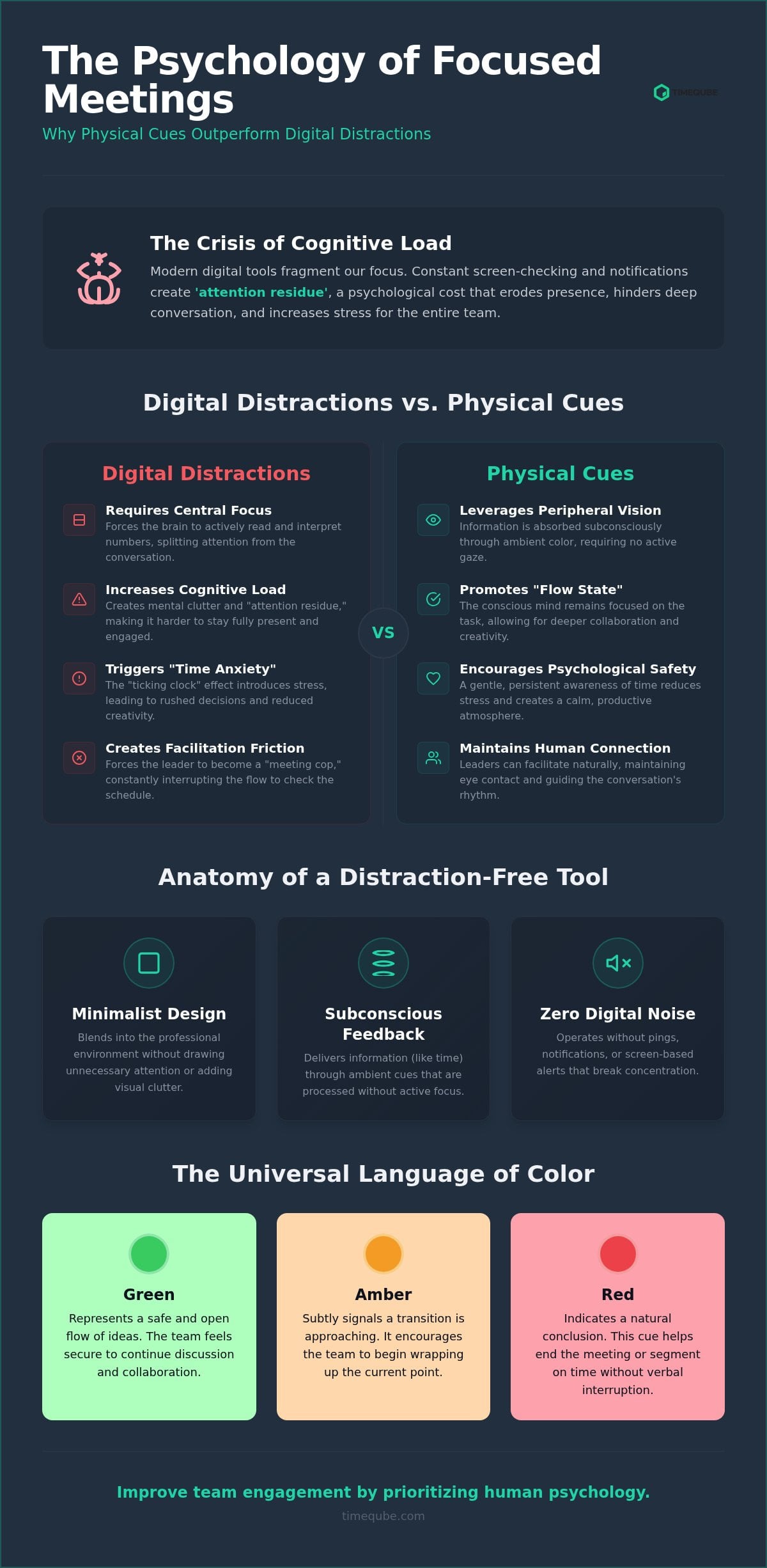
Effective leadership in 2026 relies on sophisticated attention management. Every time a facilitator checks a digital timer, they pay a silent psychological price. This cognitive switching costs more than just seconds; it erodes the quality of presence. When we toggle between deep conversation and a browser tab, we create “attention residue.” This phenomenon leaves parts of the brain anchored to the previous task, making it harder to engage fully with the people in the room. Many notification-based productivity tools promise efficiency but actually contribute to this mental clutter by demanding constant screen interaction.
Managers can identify “facilitation friction” by observing their own physical habits during a session. Do you find yourself constantly glancing at the corner of your laptop? Does your team lose eye contact when you check the schedule? These are signs that your tools are working against your brain’s natural processing limits. The shift from digital-first to sensory-first environments is a response to this exhaustion. It’s a move toward removing digital noise so that human connection can resurface in the boardroom.
The Problem with Digital Countdown Clocks
Digital numbers demand central focus to be understood. They force the brain to interpret specific symbols, which often triggers a subtle stress response. This “ticking clock” effect can stifle creative collaboration. Team members become hyper-aware of the passing seconds rather than the shared idea. In high-stakes environments, the pressure of a visible countdown can cause anxiety, leading to rushed decisions and reduced empathy. Additionally, software timers are fragile. They are easily covered by other windows or ignored during intense discussions. This creates a disconnect between the intended schedule and the actual flow of the meeting, forcing the manager to become a “meeting cop.”
Defining the Distraction-Free Meeting Stack
A true stack of distraction-free meeting tools must prioritize tranquility and awareness. These tools should provide feedback that reaches the subconscious without interrupting the conversation. In 2026, the most effective solutions are those that leverage peripheral vision. For instance, the Timeqube for Business Meetings uses color-coded light to communicate time remaining. This allows a leader to maintain authority while projecting an aura of professional harmony. The criteria for these tools include:
- Minimalist design: The tool should blend into a professional boardroom aesthetic.
- Subconscious feedback: Information should be processed without requiring an active gaze.
- Zero digital noise: No notifications, pings, or screen-based distractions.
By balancing authority with tranquility, managers can reclaim their mental space and lead with greater intentionality. Moving away from intrusive software is the first step toward a more focused team culture.
Why Physical Cues Outperform Digital Facilitation Tools
Digital tools often fail because they compete for the same cognitive resources as the meeting content itself. Physical cues, however, leverage peripheral vision to transmit information without requiring a direct gaze. This is the foundation of a more intentional approach to scheduling. Visual Time Management is the use of non-numerical cues to signal duration. By using light and color, we allow the brain to process time subconsciously. Academic research on digital distraction in meetings confirms that on-screen interruptions hinder deep work and group performance. Managers who adopt distraction-free meeting tools find that their teams are more present and less anxious.
Color-coded signals, specifically Green, Amber, and Red, communicate urgency subconsciously. Green represents a safe flow of ideas. Amber signals a transition. Red indicates a natural conclusion. This system removes the need for verbal interruptions or constant “time-checking” glances. In high-stakes corporate environments, “Time Anxiety” often leads to rushed conclusions or disjointed discussions. Physical cues provide a gentle, persistent awareness that reduces this stress. They act as a silent partner in the room, guiding the rhythm of the conversation without breaking the connection between participants.
The Subconscious Awareness Advantage
The brain processes light and color significantly faster than text or numbers. Numbers require active decoding; color requires only perception. This speed allows teams to maintain a “Flow State” during intense brainstorming sessions. When the environment signals time through light, the conscious mind stays focused on the problem at hand. Integrating professional meeting timers into standard agendas ensures that boundaries are felt rather than enforced. It turns time into a shared, silent rhythm rather than a series of disruptive alarms.
Tactile vs. Virtual Tools
Placing a physical object on the conference table has profound psychological value. It serves as a totem of intentionality. Unlike an app hidden behind browser tabs, a physical device cannot be minimized or ignored. This helps in reducing screen fatigue by moving the facilitation process off the monitor and into the physical room. By designating a physical cue as the timekeeper, you create a “sacred space” for focused work. It signals to the brain that this environment is different from the cluttered digital workspace. For those seeking to refine their boardroom aesthetics, using distraction-free meeting tools like the Timeqube for Business Meetings can transform a standard session into a masterclass in focus.
Roundup: Top Distraction-Free Meeting Tools for 2026
Selecting the right distraction-free meeting tools requires a balance between environmental control and psychological awareness. In 2026, a high-performance stack often combines physical hardware with digital silence. This ensures that the meeting space remains a sanctuary for human interaction. Effective facilitation depends on tools that provide clarity without adding to the team’s cognitive load. We have identified the most impactful solutions based on their ability to remove friction and restore focus.
Physical Hardware: The Timeqube for Business
The Timeqube for Business Meetings is a primary example of a minimalist facilitation tool. It operates silently, removing the disruptive “ping” of digital alarms that often breaks a team’s flow. Its light is visible from up to 2.5 meters, ensuring everyone in the room shares a subconscious awareness of time. Simple presets allow a manager to set boundaries for 1-on-1s or team sessions without touching a screen. This hardware fits the modern executive office where aesthetics and focus are inseparable. It’s particularly effective for gentle boundary setting, as the changing colors provide a polite, non-verbal signal that a session is nearing its end.
Digital Blockers: Freedom App
While hardware manages the room, software must protect the brain from external noise. The Freedom app allows managers to silence Slack, email, and social media during “Golden Hour” meetings. Its “Locked Mode” is particularly effective at preventing meeting drift by ensuring the session doesn’t devolve into multitasking. Research shows that even the silent presence of a smartphone leads to reduced cognitive capacity. Integrating digital silence with a physical cue ensures the team’s full mental energy is available for the task at hand. It’s a vital component for deep work sessions where any digital ping can derail a breakthrough.
Executive Frameworks: The Flevy Consultant Toolbox
Focus also requires a clear structure. The Flevy Consultant Toolbox provides templates that define meeting outcomes before the first participant arrives. These frameworks act as the “map” for the session. While a timer provides the “pace,” the template ensures the conversation remains on track. Combining static documents with dynamic visual feedback creates a professional environment where goals are met with clinical precision. For large teams, using Timequbes with your logo can further align these focus habits with your corporate identity. This combination of frameworks and hardware ensures that every meeting has both a clear direction and a steady rhythm.
Implementing a Sensory-First Meeting Culture
Establishing a sensory-first culture requires more than just new hardware. It demands a fundamental shift in how leadership views the collective attention of a team. In 2026, the most effective facilitators act as energy managers rather than mere timekeepers. Their goal is to maintain professional harmony by removing cognitive friction before it begins. This transition starts with the intentional design of the meeting environment, where every stimulus is curated to support focus rather than fragment it.
Introducing distraction-free meeting tools to a skeptical team is best achieved through a pilot phase. Start by setting clear ground rules: all digital notifications are silenced, and devices are placed out of sight. Explain that the goal isn’t control, but the preservation of the team’s mental well-being. Monitoring the ROI of these changes involves tracking qualitative data like team engagement and eye contact. Success is measured by sessions that end five minutes early without feeling rushed. When a team experiences the calm of a well-paced meeting, the resistance to new tools typically dissolves into a shared sense of presence.
Supporting Neurodiversity in Facilitation
For many teams, visual timers are not just a preference; they are essential for time management for neurodiversity. Standard digital clocks can be a source of significant anxiety for those with ADHD or other cognitive differences. Non-intrusive color cues provide a gentle framework that supports varied cognitive styles without demanding a stressful level of central focus. By creating an inclusive environment, you ensure that every participant has the mental space to contribute effectively. This approach recognizes that the human brain has biological limitations that digital software often ignores.
The “No-Screen” Facilitation Strategy
High-value collaboration often suffers when screens act as barriers between participants. Implementing a “no-screen” strategy involves banning laptops and phones during specific deep-work sessions. Managers use executive office productivity tools to signal that a meeting is a space for presence, not multitasking. This transition from digital countdowns to ambient awareness restores the natural rhythm of human conversation. It replaces the anxiety of a ticking clock with the quiet confidence of a well-paced session. By moving facilitation off the monitor, you create a sacred space for creative breakthroughs.
To begin your transition toward a more focused boardroom, explore how the Timeqube for Business Meetings can help you implement these sensory-first habits today.
Conclusion: The Future of Focused Leadership
The transition toward focused leadership requires a departure from the digital clutter of the past decade. We’ve moved beyond the era of “more apps” and entered an age where the quality of the environment dictates the quality of the output. Managers who prioritize their team’s mental space see a measurable impact on morale and engagement. By adopting distraction-free meeting tools, you signal that your team’s attention is a valuable resource that deserves protection. This shift doesn’t just improve productivity; it reduces the chronic stress associated with notification fatigue.
The most effective managers in 2026 are those who act as guardians of collective focus. They understand that every digital interruption is a withdrawal from the team’s cognitive bank. By building a custom stack of distraction-free meeting tools, you create a predictable, low-friction environment. This predictable rhythm allows for deeper creative exploration and faster decision-making. It’s a move from the chaos of notification management to the clarity of attention leadership. When you remove the friction of the “meeting cop” role, you’re free to lead with quiet confidence and intentionality.
Branding Your Productivity
Professional harmony is often reflected in the aesthetics of the workspace. Using Timequbes with Your Logo allows organizations to align their focus-driven habits with their corporate identity. These tools can be customized to match the minimalist elegance of a modern executive office. Beyond their functional value, they serve as a statement of intentionality. Turning a productivity tool into a branded executive gift also reinforces a culture of awareness across the entire leadership team. It turns a simple timekeeping device into a symbol of a sophisticated, human-centric work culture.
Getting Started with Visual Timing
Starting this journey is a matter of small, purposeful steps. Begin by trialing visual cues in a single recurring session, such as a weekly 1-on-1. Observe how the removal of digital countdowns changes the rhythm of the conversation. You don’t need to overhaul your entire workflow at once. Choose a stack that balances hardware-based awareness with digital blockers to create a comprehensive shield against noise. The goal is to return to a state of presence where eye contact is the norm and sessions end with time to spare. Experience the calm of Timeqube for your next meeting and discover the difference that sensory-first facilitation makes.
Reclaiming the Boardroom through Intentionality
True leadership in 2026 is defined by the ability to protect a team’s collective focus. We’ve explored how moving away from intrusive software toward sensory-first environments restores professional harmony. By leveraging peripheral vision and subconscious cues, managers can reduce the stress of time management while significantly increasing engagement. It’s clear that the most effective sessions are those where technology supports human psychology rather than competing with it for attention.
Integrating physical distraction-free meeting tools into your workflow ensures that eye contact and connection remain the priority. Timeqube offers minimalist hardware specifically designed for professional harmony. It’s a solution used by therapists and executives worldwide to reduce cognitive load and eliminate the friction of digital alerts. Elevate your meeting focus with Timeqube and transform your next session into a masterclass in presence. Your team’s attention is their most valuable asset; lead them with the quiet confidence and clarity they deserve.
Frequently Asked Questions
What are the best distraction-free meeting tools for remote teams?
Remote teams benefit from a combination of hardware on the desk and software silencers. A physical device like a Timeqube remains visible in the user’s workspace even when the screen is cluttered with video feeds. This creates a tangible boundary between work and home environments. Using distraction-free meeting tools in a home office helps maintain professional rhythm without the intrusive pings of digital notifications that typically derail virtual collaboration.
How do visual timers help with ADHD in professional meetings?
Visual timers reduce the stress of time blindness by providing a constant, non-intrusive signal of duration. For individuals with ADHD, traditional digital clocks can trigger anxiety or be easily ignored. Light-based cues reach the brain through peripheral vision, offering a gentle reminder of the session’s flow. This allows participants to remain engaged in the conversation rather than constantly checking the clock, which supports more effective attention management and focus.
Can physical timers be used alongside digital meeting software like Zoom?
Yes, physical timers are ideal companions for digital platforms. By placing a device on your desk or within the camera’s frame, you establish a shared visual rhythm for all participants. This technique effectively bridges the gap between the physical and digital boardroom. It prevents the need to minimize video windows to check a timer, ensuring that eye contact and presence remain uninterrupted during high-stakes virtual sessions or brainstorming rounds.
Why should I choose a physical timer over a free app?
Physical hardware avoids the notification trap inherent in software. Free apps exist on the same screen as your distractions, which often leads to multitasking. A physical object serves as a dedicated totem of focus that cannot be minimized or hidden by other windows. It reduces screen fatigue and provides persistent feedback that software simply cannot match. This makes hardware the superior choice for creating a truly tranquil and intentional workspace.
How do I introduce a visual timer to my corporate team without it feeling patronizing?
Frame the introduction as a commitment to the team’s mental well-being and time. Explain that the goal is to end meetings five minutes early and reduce the need for verbal interruptions. Positioning the tool as an energy manager rather than a time cop helps remove the stigma of monitoring. Most professionals appreciate the clarity and focus that distraction-free meeting tools provide once they experience a session that flows without digital noise.
What is the science behind peripheral vision and time management?
The brain processes light and color through peripheral vision faster than it decodes numerical symbols. This allows the subconscious to monitor time while the conscious mind remains focused on the meeting content. Central focus is a limited resource that shouldn’t be wasted on reading a clock. By using color-coded light, we leverage biological pathways to maintain awareness without causing the cognitive fatigue associated with constant screen monitoring and symbol interpretation.
Are there customizable meeting tools for corporate branding?
Professional organizations can utilize Timequbes with Your Logo to align productivity habits with their corporate identity. These customizable tools serve as a functional part of the boardroom aesthetic while reinforcing a culture of intentionality. Branded hardware also makes an excellent executive gift, signaling a company-wide commitment to focus and mental health. This customization ensures that your focus tools feel like a natural extension of your professional environment and brand values.
How do distraction-free tools improve meeting ROI for managers?
Distraction-free tools improve ROI by reducing the time lost to transitions and digital interruptions. When meetings end early and participants stay engaged, the cost per session decreases while the quality of decisions increases. Managers report higher team morale and reduced personal stress when they no longer have to facilitate as a timekeeper. Investing in a focused environment pays dividends in collective productivity and the long-term retention of top-tier talent.