

A productive meeting starts before anyone joins the room. Meeting design is the deliberate planning behind a meeting, while facilitation guides the discussion, supports participation and keeps the group focused on its goal. The most useful meeting facilitation tools for managers connect that purpose to a clear process, from setting outcomes and shaping an agenda to guiding discussion and recording decisions.
It’s easy to assume a fuller agenda or a firmer hand will make a meeting more effective. But structure works best when people understand why they’re meeting and how they can contribute. A few well-chosen methods can reduce friction without making discussion feel rigid.
This article covers how to plan purposeful meetings with IDOARRT, choose formats for individual, pair, and team discussion, and build alignment through practical activities. You’ll also learn how visual time cues can help a group stay aware of time while keeping attention on the conversation.
Key Takeaways
- Choose participants for the meeting’s purpose, then arrange the space to support visibility, comfort and interaction.
- Set the intended outcome before building an agenda, and make each topic’s process, time allocation and owner clear.
- Use individual reflection, paired exchanges and group discussion to give people different ways to contribute.
- Surface differing views with structured activities, then clarify how the group will make decisions.
- Close by reviewing decisions and assigning each action a clear owner, task and deadline.
1. What is Meeting Design and Facilitation?
Meeting design is the preparation that gives a meeting direction; facilitation guides discussion toward its agreed goal. The best meeting facilitation tools for managers support both: a clear agenda, participation methods, visual ways to track ideas, and time cues. Choose tools for the work, not their novelty. A decision meeting needs a clear decision process, while brainstorming needs room to develop ideas.
Start with the people. Invite decision-makers and participants with relevant expertise, keeping attendance aligned with the meeting’s purpose. Then prepare the environment: arrange chairs so people can see one another, allow participants to choose seats, and adapt the layout to the group. For a hybrid meeting, check that remote attendees can hear, see shared materials, and join the same discussion.
Facilitator behavior shapes participation as much as the agenda. Stay neutral, listen closely, paraphrase key points, and ask clarifying questions. Use direct questions, round-robin turns, small-group breakouts, or anonymous submissions to bring different perspectives into view. If one voice dominates, invite others in without putting anyone on the spot. A one-minute introduction gives each participant a defined moment to speak; a go-round lets everyone reflect before the group moves on.
Explain each method before using it. State its purpose, what participants will do, and how the group will use the results. For example, brainwriting lets people generate and build on ideas before evaluating them together. If discussion drifts, capture unrelated topics in a parking lot and return to the agenda. This keeps the group focused without shutting down useful contributions.
For brainstorming and interactive workshops, combine brainwriting with small-group breakouts, then use dot-voting to identify the options participants find most relevant. Free, low-tech methods include round-robins, direct prompts, and anonymous idea submissions. They need facilitation, not dedicated software. Choose a method that fits the desired output, such as a shortlist or a shared set of ideas.
For remote and hybrid teams, choose methods that include everyone, whether people contribute aloud or in writing. Compare tools by the task they support, ease of participation, and how clearly they capture ideas. A physical visual timer, such as Timeqube for Business Meetings, makes time visible without adding another digital interface to the discussion.
Cost per user depends on a tool’s features, subscription structure, and number of seats. Compare the functions your team will use with the pricing structure, and avoid paying for features unrelated to the meeting’s purpose. For privacy, consider what information a tool collects, who can access shared materials, and whether sessions are recorded. Tell participants when recording is used, and agree how notes and shared content will be handled.
2. Setting meeting purpose and structure with IDOARRT
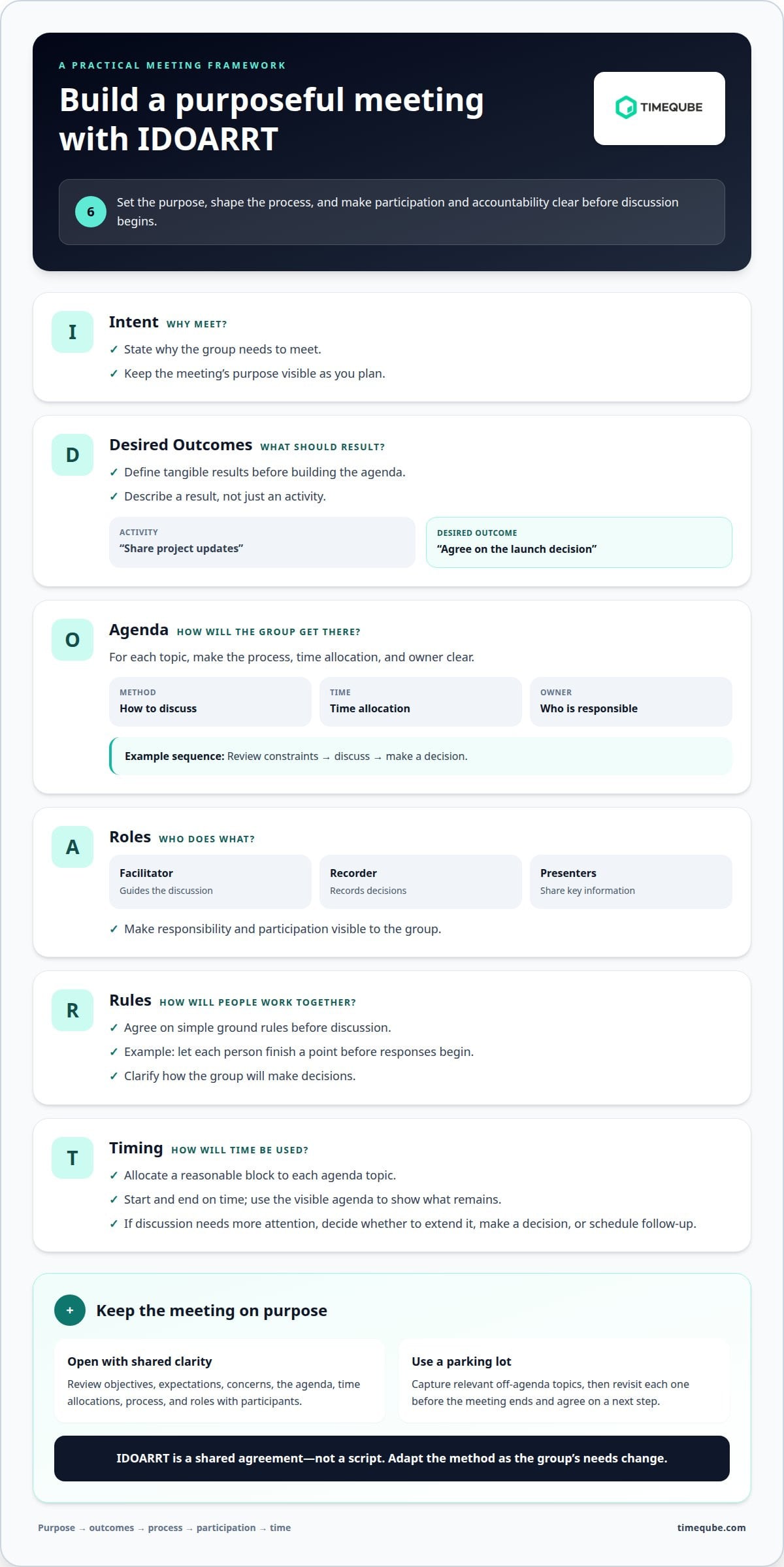
IDOARRT gives managers a practical structure for turning a meeting purpose into a workable session. A meeting structure can help clarify its purpose, outcomes, agenda, roles, ground rules, and timing. Start with Intent: state why the group needs to meet. Then define the Desired Outcomes as tangible results. For example, “share project updates” describes an activity, while “agree on the launch decision” names an outcome.
Build the agenda once the outcome is clear. For each topic, identify the method, time allocation, and person responsible. A launch decision might begin with a brief review of constraints, move into discussion, and end with a decision. Match the method to the work: use open discussion to explore concerns, then clarify how the group will decide. This keeps conversation connected to the stated purpose.
Roles make participation and accountability visible. Name someone to facilitate, someone to record decisions, and the people responsible for presenting key information. Agree on simple rules, such as letting each person finish a point before responses begin. At the opening, review the objectives, expectations, concerns, agenda, time allocations, process, and roles with participants.
Time is part of the design, not a signal to rush. Allocate a reasonable block to each agenda topic, and start and end on time. If a discussion needs more attention, ask the group whether to extend it, make a decision, or schedule follow-up. A visible agenda shows participants what remains and helps the facilitator redirect discussion without dismissing useful concerns.
Keep a parking lot for relevant topics outside the agenda. If a project discussion shifts to a separate staffing issue, record it there instead of letting it take over. Before the meeting ends, revisit each parked topic and agree on a next step, such as assigning an owner or adding it to a future agenda. This preserves valuable input while protecting the meeting’s core goal.
IDOARRT works best as a shared agreement, not a script imposed on the group. Invite participants to clarify the desired outcome and flag missing agenda items before discussion begins. If expectations differ, pause to resolve them. Then use the agreed structure as a guide, adapting the method as the group’s needs change. The result is a purposeful agenda that gives each conversation a clear place and direction.
3. Structured discussion in individual, pair, and team formats
A discussion becomes more balanced when participants have time to think before responding. The One-Two-Four-All method moves from individual reflection to pairs, groups of four, and then the full team. Start with a specific question and invite people to reflect for a minute. They first form their own ideas, then compare perspectives in smaller conversations before sharing themes with everyone.
Use each stage for a different purpose. Individual thinking gives quieter participants room to develop a view without competing for airtime. Pairs let people test an idea and refine its wording. The team discussion can then focus on patterns, differences, and decisions instead of collecting first reactions. For a group of four, adapt the sequence to One-Two-All and skip the quartet step.
Keep discussion focused by summarizing what you hear and naming the next question. If a topic has several parts, timebox each one and tell participants when the group will move on. A brief summary might be: “We agree on the goal; the unresolved point is ownership.” This distinguishes shared understanding from an open issue and helps the group avoid circling back without new information.
Agree on simple Finger Rules before a complex discussion. For example, the group can choose a hand signal for wanting to speak, asking for clarification, or showing agreement. Define the signals together so everyone interprets them consistently. These cues make it easier to notice a request without interrupting someone, especially in a fast-moving conversation.
Use ELMO when discussion repeats the same points. Participants signal that the conversation is going in circles, and the facilitator invites the group to move to the next topic. First, summarize what has already been heard. Then ask whether anyone has new information or a different proposal. If not, record the unresolved item and continue with the agenda.
A Parking Lot can capture useful ideas that sit outside the current question. Keep its items visible, but distinguish them from decisions the group needs to make now. To track priorities, invite participants to use prioritisation dots. Each person can receive 1 to 6 dots, then place them beside the options they consider most relevant. Dot-voting takes 5 to 10 minutes and suits groups of up to 50 people.
Close the discussion by reading back the leading option and the reasoning behind it. Ask participants to correct the summary before recording a decision or next step. This final check turns discussion into a shared commitment, while a visible record keeps ideas organized for follow-up.
4. Building alignment and planning strategy
Alignment means a team understands the decision, the reasons behind it, and the next commitments. Start by naming the strategic question, such as which customer need the team will prioritize. Ask participants what they agree on, where concerns remain, and what information would help them decide. Record shared priorities separately from unresolved points so agreement doesn’t appear broader than it is.
To make differences visible, use a spectrum activity. Mark a line from strongly agree to strongly disagree, then invite participants to position themselves in response to a statement. Ask people at different points to explain their reasoning. The aim isn’t to push everyone toward the middle. It’s to reveal assumptions and interests a quick verbal vote might conceal.
Trust also depends on how a group handles candid feedback. One Breath Feedback gives each participant a brief turn to share an observation or response. The facilitator might ask, “What helped you contribute, and what made it harder?” Listen without rebuttal, reflect the concern back, and clarify what the group can change. This keeps feedback specific and gives quieter participants room to speak.
For more sensitive conversations, Sentence Completions can open a lower-pressure exchange. Offer a prompt such as, “The support I need to communicate directly is…” Participants can respond in pairs, small groups, or around a circle. Set a clear purpose, invite people to share only what they choose, and focus on listening rather than fixing. The exercise can surface conditions that affect honest participation.
A team can build understanding through a shared timeline. Invite members to map when people joined, key group activities, and external conditions shaping the work. Use the timeline to notice different experiences, not assign blame. A newer teammate may describe a process differently from someone who helped create it. Comparing those views can reveal assumptions to discuss before setting strategy.
Then turn insight into planning. Ask the group to name the strategic choice, evidence supporting it, risks, and follow-up owners. If concerns persist, capture them beside the proposal rather than treating silence as agreement. Invite a less-recognized team member to lead or co-facilitate part of the discussion. This can broaden attention and show that contributions matter beyond formal status.
Close with a brief round of feedback on the process. Ask what helped the team speak candidly and what hindered participation, then identify one adjustment for the next session. A written record of the decision, open concerns, and commitments gives the group a shared reference point. Trust grows through repeated actions: listening carefully, acknowledging differences, and following through on agreed work.
5. Meeting design and facilitation
Managers run more productive meetings by matching each facilitation method to the work. Use brainstorming to generate options, structured dialogue to examine differences, and a clear decision process to choose an action. Design the session beforehand, guide participation during it, and turn outcomes into follow-up afterward.
Think of the meeting as a sequence: preparation, opening, working discussion, and close. Beforehand, test the technology, arrange the space for interaction, and prepare the materials participants need. For a virtual workshop, open the shared document before the call and ensure everyone can access it. In person, arrange chairs to support conversation rather than a presentation-only format.
At the opening, explain the purpose and method for each activity. Assign a facilitator to guide the process and a recorder to capture ideas, decisions, and action items. These roles let other participants focus on the content. The facilitator should remain neutral, draw out relevant contributions, and flag when discussion strays from its goal. A team leader can take either role, but should distinguish managing the process from advocating for a preferred answer.
Sequence activities with care. Begin with a lower-stakes prompt before a strategy debate or conflict discussion, giving the group time to engage. For complex planning, Six Thinking Hats takes 30 minutes to 1 hour for groups of 5 to 20 people per group. It gives participants a structured way to consider an issue from different perspectives. Choose a method that fits the decision, the group’s familiarity, and the depth of discussion required.
During the session, track both time and understanding. Summarize the group’s current view, invite corrections, and record unresolved questions where everyone can see them. For a complex concept, repeat the message and ask a participant to restate it. This checks shared understanding before the team commits. If discussion stalls, clarify whether the group needs more information, a different method, or a decision from someone with authority.
Close by reading back each decision and action. Every action item needs a defined task, an assigned owner, and a completion deadline. Share the notes with participants, then begin the next meeting by reviewing the running list of commitments. This follow-through connects discussion to learning and makes unresolved work easier to spot.
Afterward, ask participants what helped or hindered engagement, or reflect on where the process lost focus. Use one specific observation to adjust the next session, such as clarifying the decision method or allowing more time for questions. Good facilitation is an ongoing practice: each meeting gives the leader a chance to try a relevant technique and refine how the group works.
Timeqube: Timeqube for Mind/Body Therapies
Timeqube for Mind/Body Therapies gives practitioners a physical visual timer for sessions where gentle time awareness matters. Its color-coded light signals make time visible without digital distractions. This can suit a practice where clients and practitioners want to stay present while keeping a session within its intended time.
For workplace discussions, Timeqube for Business Meetings offers visual timing support for the meeting environment. Timequbes with Your Logo provide a branded option for businesses. These tools support time awareness; they don’t replace a clear purpose, thoughtful facilitation, or agreed decisions.
To explore a visual timer for therapy sessions, visit the Timeqube for Mind/Body Therapies page.
Make your next meeting more intentional
Choose an upcoming meeting and make a deliberate change to its design. You might clarify what the group needs to decide, invite participants to reflect before discussion, or make time boundaries easier to notice. Observe how that choice shapes the conversation, then use what you learn to refine the next session. A small, purposeful adjustment gives your team a practical starting point without requiring a complete overhaul.
The most useful meeting facilitation tools for managers support the attention and participation their meetings need. A visual timer can make time visible while participants stay with the discussion. If a physical timing tool suits your business meetings, explore Timeqube as an option for your meeting environment.
Contact Timeqube about meeting tools to explore the option. Start with one thoughtful change, and let each meeting build on the learning from the last.
Frequently Asked Questions
What is Meeting Design and Facilitation?
Meeting design shapes the conditions for useful work; facilitation helps the group work within them. For example, a manager planning a project review might decide beforehand which teams need to contribute, then guide discussion so dependencies surface. Design addresses the meeting’s setup and sequence. Facilitation responds to what happens in the room, including confusion, competing views, or a decision that needs clarification.
Are these techniques only for big workshops, or do they work in normal team meetings?
These approaches work in regular team meetings, too. Use a quick round of updates when everyone needs to share progress, or ask pairs to compare options before a team decision. A workshop may need several activities and transitions, while a weekly check-in might need only one clear prompt. Choose the simplest structure that helps people contribute and gives the meeting a useful result.
How do I handle the person who dominates the meeting?
Interrupt the pattern respectfully and make space for other perspectives. You might say, “Thanks, I’ve captured that. Let’s hear from someone who hasn’t spoken yet.” If interruptions continue, use agreed turn-taking or ask participants to write ideas before sharing. If the behavior persists, speak privately afterward and describe its effect on the group rather than labeling the person.
What are the key elements in planning a meeting?
Start with the decision or output the meeting must produce. Identify who needs to contribute, what information they need beforehand, and how the group will work through the issue. Leave space for questions and note what should happen afterward. For example, a project review can end with a brief recap of unresolved dependencies, so the next discussion starts with specific information rather than general updates.
What’s the single most common facilitation mistake?
A common mistake is treating the agenda as a script instead of a guide for shared work. If the team raises a relevant risk, acknowledge it and decide whether it belongs in the current discussion or needs follow-up. Rushing on can leave concerns unspoken; abandoning the agenda can obscure the meeting’s purpose. Make the choice explicit, then clarify what happens next.
When should I use these activities?
Use an activity when it addresses a clear participation or thinking need. Invite private reflection before a sensitive discussion, paired exchanges when people need to test an idea, and a group prioritization method when options compete. For a straightforward information update, a structured exercise may add unnecessary steps. Match the format to what people need to do, such as surface concerns, compare approaches, or commit to action.
Which tools support agendas, notes, and action-item tracking?
Shared documents can hold an agenda, meeting notes, and decisions in one accessible place. A virtual whiteboard can help groups organize ideas visually, while polling can gather input quickly. Project management platforms can track assigned actions after the meeting. Keep the system simple: record each commitment with its owner and deadline, then share the notes so participants can refer to the same record.
How do meeting facilitation tools compare for features and ease of use?
Compare tools by the task they support, how easily participants can contribute, and how clearly they capture ideas. Low-tech methods such as round-robins and anonymous submissions rely on facilitation, not dedicated software.