
The human brain was never designed to process the high-frequency digital pings of a modern open-office environment. You likely feel the weight of notification fatigue and the rising anxiety that comes with timed meetings. It’s becoming harder to maintain presence when your sensory environment is in a state of constant friction. Finding effective sensory focus tools for office environments is no longer a luxury. It is a physiological necessity for sustainable performance.
You deserve a workspace that supports your mental well-being rather than depleting it. We’ll show you how to optimize your cognitive load and reclaim your professional focus using science-backed tools. This guide explores how shifting from digital interruptions to subconscious peripheral cues can lower anxiety and extend deep-work sessions. You will discover a sophisticated approach to creating a more inclusive workplace that values human perception and intentionality.
Key Takeaways
- Identify the biological triggers that turn office noise into cognitive friction. Learn to transition from a survival response to a state of professional presence.
- Discover the five essential categories of sensory focus tools for office environments to ground your physical and mental state.
- Master the science of peripheral vision to manage time without the stress of digital countdowns. Subconscious visual cues respect your brain’s natural processing limits.
- Execute a personal sensory audit to pinpoint specific triggers that deplete your energy. Select tools that align with a minimalist, high-end professional aesthetic.
- Leverage dedicated hardware solutions to remove digital friction. Color-coded light signals provide a tranquil way to maintain focus during high-stakes tasks.
Understanding Sensory Load: Why Office Environments Disrupt Professional Focus
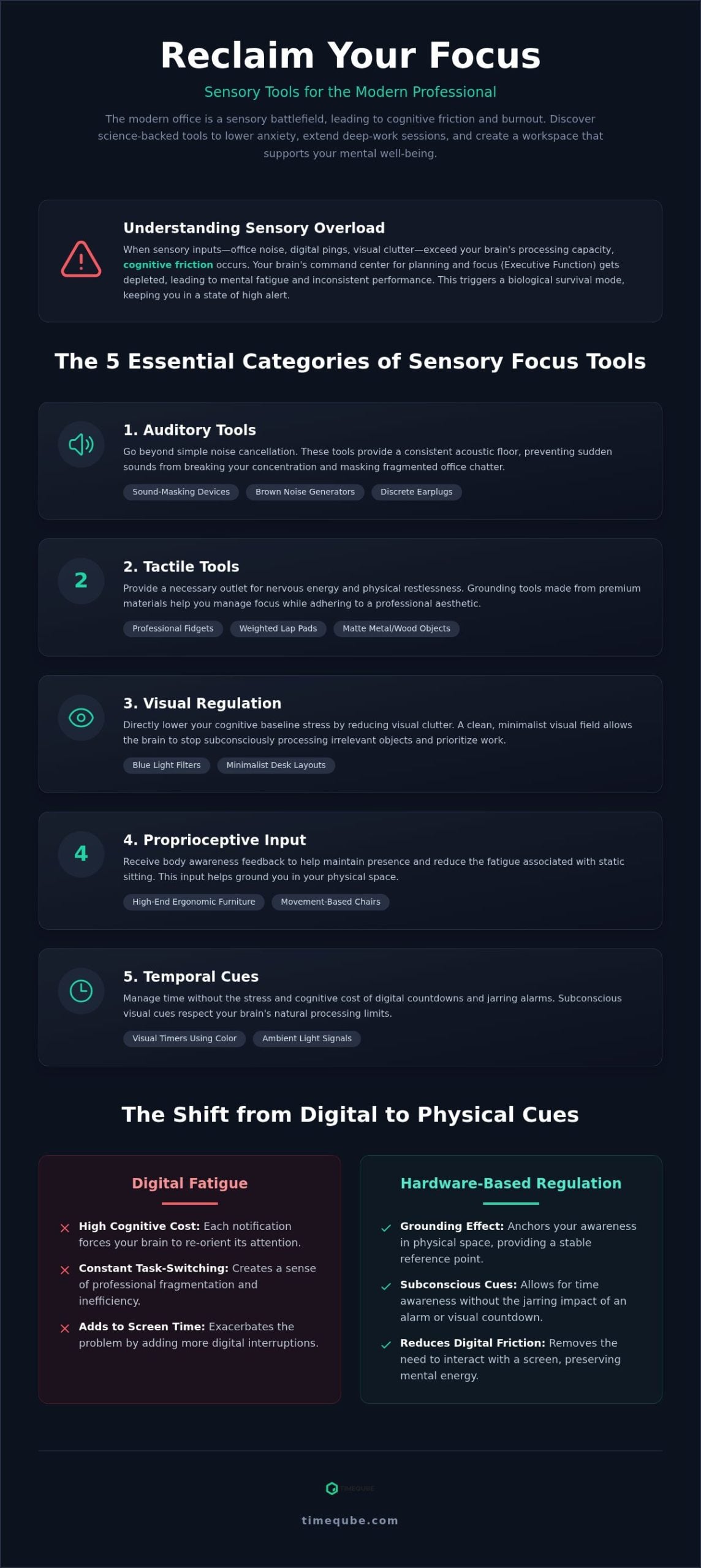
The modern open office is a sensory battlefield. Sensory load refers to the total volume of stimuli processed by the nervous system at any given moment. In professional settings, this load includes the hum of air conditioning, fragmented conversations, and the persistent blue light of screens. When these inputs exceed your brain’s processing capacity, cognitive friction occurs. Implementing sensory focus tools for office environments helps mitigate this load and allows for a smoother transition into deep work.
Constant exposure to unaccommodated sensory input triggers a biological survival mode. The amygdala perceives background noise and visual clutter as potential threats. This keeps the nervous system in a state of high alert. Prolonged activation leads to workplace burnout. You aren’t just tired; your brain is exhausted from filtering irrelevant data. Many professionals rely on digital productivity apps to manage their time, yet these tools often exacerbate the problem. They add more notifications and more screen time, forcing the brain to stay in a state of taxing central focus.
The Impact of Sensory Processing on Executive Function
Executive function is the brain’s command center. It manages planning, focus, and emotional control. Sensory overload depletes this biological battery. For individuals with ADHD or Autism, office triggers are significantly magnified. The brain struggles to prioritize tasks when the environment feels chaotic. Pushing through this discomfort is counterproductive. It leads to inconsistent performance and deepens mental fatigue. Integrating sensory focus tools for office use helps preserve this executive energy for actual work.
Digital Fatigue vs. Hardware-Based Regulation
Switching between deep work and a digital timer notification has a high cognitive cost. Each ping forces your brain to re-orient its attention. This constant task-switching creates a sense of professional fragmentation. Physical hardware provides a grounding effect that virtual tools cannot replicate. It anchors your awareness in the physical space, offering a stable reference point. Subconscious cues, such as the color-coded signals found in Timeqube for Mind/Body Therapies, allow for time awareness without the jarring impact of an alarm. Sensory regulation is a professional necessity rather than a luxury.
The 5 Essential Categories of Sensory Focus Tools for Professionals
Optimizing a workspace requires a granular understanding of how stimuli affect the nervous system. Selecting the right sensory focus tools for office environments involves addressing five core biological channels. These interventions reduce environmental friction and preserve cognitive energy for high-value tasks.
- Auditory Tools: These go beyond simple noise cancellation. Sound-masking devices and brown noise generators provide a consistent acoustic floor that prevents sudden sounds from breaking concentration.
- Tactile Tools: Subtle professional fidgets and weighted lap pads provide grounding. These tools help manage physical restlessness without distracting colleagues.
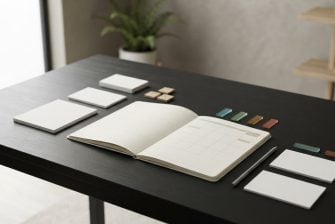
- Visual Regulation: Blue light filters and minimalist desk layouts reduce the baseline cognitive load. A clean visual field allows the brain to prioritize work-related information.
- Proprioceptive Input: High-end ergonomic furniture provides body awareness feedback. This helps maintain presence and reduces the fatigue associated with static sitting.
- Temporal Cues: Visual timers use color to signal time subconsciously. This removes the stress of digital countdowns and auditory alarms.
Auditory and Tactile Solutions for Open Offices
Choosing between earplugs and white noise machines depends on your specific sensitivity. Discrete earplugs are effective for total isolation, while white noise machines are better for masking fragmented office chatter. For professionals managing ADHD, tactile tools offer a necessary outlet for nervous energy. Selecting tools made from premium materials like wood or matte metal ensures they remain boardroom-appropriate. These solutions allow you to maintain focus while adhering to corporate aesthetic standards.
Visual and Temporal Regulation: The New Frontier
Reducing visual clutter is a direct way to lower your cognitive baseline stress. A minimalist desk setup removes the subconscious processing of irrelevant objects. Beyond physical space, how we perceive time is a critical sensory factor. Passive time tracking is often more effective than active countdowns. Digital clocks create a sense of urgency that can trigger chronophobia, or the fear of time passing. Shifting to visual cues allows the brain to process durations through peripheral vision. This method is particularly effective when considering visual timers for neurodiversity. For those leading teams, using a Timeqube for Business Meetings can transform the sensory atmosphere of a room. It replaces high-pressure digital alarms with a tranquil, color-coded flow.
Visual Sensory Regulation: Why Peripheral Cues Beat Digital Alarms
Time perception is a vital sensory input that most professionals ignore until it becomes a source of stress. Traditional timekeeping relies on central vision; it requires you to stop your current task to read and interpret numbers. This constant shifting of focus creates cognitive friction. Integrating sensory focus tools for office settings allows you to leverage peripheral awareness. This biological shortcut processes information without interrupting your primary train of thought.
Chronophobia, or the anxiety associated with the passage of time, often manifests in the workplace as a persistent worry about deadlines. Digital countdowns exacerbate this by highlighting every passing second. This triggers a mild stress response in the nervous system, which is the antithesis of professional focus. Visual cues replace this pressure with a sense of calm progression. They offer several distinct advantages for the modern professional:
- Reduced cognitive load by avoiding the need to decode numeric symbols
- Elimination of the startle response often triggered by sudden auditory alarms
- Maintenance of flow state through continuous, subconscious awareness
The Cognitive Science of Color-Coded Time
The human brain is hardwired to respond to color signals faster than it decodes alphanumeric data. Green, yellow, and red are universal sensory signals that facilitate subconscious pacing. In a meeting, a subtle shift in color provides a gentle nudge rather than a jarring alarm. This reduces the “Are we done yet?” anxiety that often plagues long sessions. Participants stay engaged because the reminder of time is persistent yet unobtrusive. Peripheral cues allow the brain to stay in “Deep Work” while tracking time.
Digital Clocks vs. Visual Timers
Reading a digital clock involves a high cognitive load because your brain must translate a symbol into a concept of duration. This process is active and disruptive. In contrast, seeing a change in light is a passive experience that respects your mental space. Digital devices also present a specific risk known as the “Distraction Loop.” You check your phone for the time, see a notification, and find yourself scrolling through social media minutes later. Visual hardware eliminates this risk by providing a single, dedicated function. Understanding the science of visual cues helps in choosing tools that promote a distraction-free environment. Shifting to visual regulation fosters a workspace where flow state is the default, not the exception.
Creating an Inclusive Sensory Workspace: A Step-by-Step Implementation
Building an inclusive environment requires a transition from reactive adjustments to intentional design. You must audit your current workspace to understand where biological friction occurs. Integrating sensory focus tools for office use is most effective when done systematically. This approach ensures that your interventions are both functional and sustainable within a corporate culture. Establishing sensory zones for different types of professional tasks allows the brain to prepare for specific cognitive demands based on the environment. This design often includes biophilic elements like office plants; for those seeking to maintain healthy greenery naturally, GrowQanz provides organic microbial technologies that support robust plant growth and soil health.
The Personal Sensory Audit
A successful intervention begins with data. Conduct a personal audit to pinpoint exactly which environmental factors trigger a stress response. This process removes the guesswork from your sensory management strategy and ensures you don’t waste resources on ineffective tools.
- Step 1: Track energy levels against environmental changes for one week. Record when you feel depleted and note the specific stimuli present at that moment.
- Step 2: Identify the primary “Distraction Vector.” Determine if sound, light, or time management is the most significant drain on your executive function.
- Step 3: Introduce one tool at a time. This allows you to measure the efficacy of each intervention without introducing new variables that could cloud the results.
Professional environments often have unwritten rules about appearance. The “Low-Aesthetic” rule suggests choosing tools that match corporate standards. Opt for high-quality materials and minimalist designs that blend into a boardroom. For sourcing high-quality office essentials and lifestyle products, TengoHub offers a curated selection that meets these professional standards. When communicating needs to management, focus on performance outcomes. Explain that certain environmental adjustments help you maintain deep focus and meeting efficiency. You don’t need to disclose a diagnosis to advocate for a more productive work environment. Focus the conversation on reclaimed professional hours and reduced cognitive fatigue.
Universal Design benefits everyone, not just those with specific sensory needs. Introducing visual timers to meetings helps the entire team stay on track without the stress of an alarm. It creates a shared, subconscious understanding of time. This collective approach reduces individual anxiety and fosters a culture of professional harmony. For organizations looking to scale this, custom logo timers for teams provide a branded way to integrate sensory regulation. Shared tools normalize the use of sensory support and reduce the stigma often associated with individual accommodations.
Ready to transform your team’s productivity? Explore the Timeqube for Business Meetings to create a more inclusive, focus-driven environment.
Timeqube: The Mindful Hardware Solution for Sensory Time Management
Timeqube represents a fundamental shift in how we interact with the passage of time. It’s a dedicated sensory tool designed to bridge the gap between high-stakes focus and mental well-being. By adopting a “No-Button, No-Screen” philosophy, it removes the digital friction that typically accompanies time management. This hardware-only approach ensures that your awareness remains grounded in the physical world. It’s a sophisticated addition to any professional sensory toolkit, offering a way to track time without the cognitive cost of task-switching.
Designed for the Subconscious
The human brain processes visual stimuli in the periphery with remarkable efficiency. Timeqube utilizes this biological shortcut through its distinct cube shape and smooth color transitions. These signals are optimized for peripheral vision, meaning you stay aware of time without ever having to look directly at a clock. This preserves your central focus for the task at hand. There’s a total absence of ticking or beeping, which eliminates the auditory triggers that often cause micro-distractions. By removing these stressors, the device facilitates a more natural entry into flow state. This makes it one of the most effective sensory focus tools for office settings available. You can explore Timeqube for professional focus to see how this hardware respects your nervous system’s limits.
The efficacy of visual time management is well-documented in clinical settings. The same principles that make Timeqube for Mind/Body Therapies successful are now being applied to corporate peak performance. In therapy, maintaining presence is critical for progress. In the office, that same presence translates to deeper insights and higher productivity. Shifting from a numeric countdown to a color-coded glow reduces the biological survival mode response and fosters a sense of professional harmony.
A Professional Aesthetic for the Modern Office
A sensory tool must align with the environment it serves. Timeqube features a minimalist design that complements high-end office interiors. For organizations, Timequbes with Your Logo allow sensory inclusion to become a part of the corporate identity. This normalization of sensory support helps build a more inclusive workplace. It fits perfectly into the Timeqube for Business Meetings model, where the goal is collective focus rather than individual pressure. Reclaim your professional focus today with a solution that values your mental space as much as your time.
Reclaiming Your Professional Presence
Modern productivity requires a shift from digital distractions to biological harmony. By implementing sensory focus tools for office use, you respect the brain’s natural processing limits and preserve executive function. Shifting to peripheral awareness allows for deep work without the jarring interruption of numeric alarms. Integrating hardware-only solutions ensures your focus remains on the task rather than the tool. It’s a transition that fosters a more inclusive and intentional workplace environment for everyone.
This approach is used by therapists and corporate leaders worldwide to eliminate notification fatigue. By utilizing tools optimized for peripheral vision awareness, you reduce the anxiety associated with time tracking. You are now equipped to curate a workspace that honors your mental space and supports consistent performance. Reclaiming your focus starts with a single, mindful change to your physical environment. Discover how Timeqube can transform your office focus and help you maintain a state of professional harmony throughout your day.
Frequently Asked Questions
What are the best sensory focus tools for adults with ADHD in an office?
The most effective tools include noise-masking devices, tactile fidgets made from professional materials, and peripheral visual timers. These address the common ADHD need for grounding and consistent stimulation without causing distraction to others. High-quality materials like wood or metal ensure they look appropriate in a corporate setting. They help manage physical restlessness and maintain focus during long tasks or demanding meetings.
How do visual timers help with sensory processing issues at work?
Visual timers provide a non-intrusive way to track time through gentle color changes. This reduces the cognitive load required to decode numbers or handle sudden auditory alerts. For those with sensory sensitivities, the soft glow of a peripheral signal is far less jarring than a ringing alarm. It allows the nervous system to remain calm while maintaining an awareness of deadlines and schedule transitions throughout the day.
Can sensory tools be used in professional meetings without being distracting?
Yes, many tools are designed specifically for professional discretion. Minimalist hardware that uses light rather than sound integrates seamlessly into boardroom environments. These tools often become a shared benefit for the whole team, reducing group anxiety about meeting length. Choosing devices with a sophisticated aesthetic ensures they are perceived as productivity aids rather than personal toys. They foster a collective sense of presence and focus.
What is the difference between a digital timer and a physical visual timer for focus?
Digital timers often involve screens and notifications that lead to task-switching and digital fatigue. A physical visual timer is a dedicated hardware solution that uses the brain’s peripheral vision. This allows for subconscious time tracking without the need to look away from your work. Physical tools also provide a grounding presence that digital software cannot replicate in a virtual or hybrid work environment.
Do I need a diagnosis to use sensory focus tools in my workplace?
No, sensory regulation is a universal biological need for cognitive efficiency. While these tools are essential for neurodivergent professionals, they offer significant benefits to anyone facing digital saturation. You don’t need a medical label to optimize your environment for better focus. Many corporate leaders use sensory focus tools for office productivity simply to reclaim their mental space and reduce daily stress levels.
How do I explain my need for sensory tools to my boss or colleagues?
Frame the conversation around performance and efficiency rather than personal deficits. Explain how specific environmental adjustments help you maintain deep focus and deliver higher-quality work. You can describe these tools as professional productivity aids that manage cognitive load. Most managers support interventions that lead to reclaimed hours and more effective meeting management without needing to know specific medical details or personal history.
Are there sensory tools that help specifically with time blindness?
Physical timers that use color-coded transitions are excellent for managing time blindness. They provide a tangible sense of time passing through visual cues that the brain processes subconsciously. This helps professionals anticipate transitions before they happen. By externalizing the passage of time in a non-stressful way, these tools help bridge the gap between internal time perception and external schedules or deadlines.
What is the best way to reduce sensory overload in an open-plan office?
Creating a multi-layered sensory defense is the most effective strategy. Combine auditory masking with visual regulation and tactile grounding. Using sensory focus tools for office settings helps you build a personal focus bubble. This might include high-quality noise-masking earplugs, a minimalist desk setup, and a peripheral timer to manage your work blocks. These layers work together to lower your baseline stress.