

The most useful workplace accommodations for time blindness address the specific point where time pressure disrupts essential job duties. Under the ADA, employers must provide reasonable accommodations to qualified individuals with disabilities so they can perform those duties, according to the U.S. Equal Employment Opportunity Commission. The right adjustment depends on the barrier, not simply on adding more reminders.
Time tools can support awareness, but they may not solve a schedule with no room to transition between tasks or meetings. This guide explains how calendars, visual timers, flexible expectations, task planning, and ADA requests can address different workplace barriers. You’ll learn to identify where time slips away and choose practical supports that make the workday easier to navigate.
Key Takeaways
- Use visible time cues, reminders, and planned focus blocks to make transitions and upcoming commitments easier to track.
- Consider whether adjusted hours or results-focused expectations would address the main barrier while preserving essential job duties.
- Break large assignments into smaller milestones, and leave buffer time around tasks that tend to run long.
- Under the ADA, reasonable accommodations help qualified individuals with disabilities perform essential job functions, according to the U.S. Equal Employment Opportunity Commission.
- Start with the workplace bottleneck that creates the most friction, then select a small set of supports suited to that specific challenge.
1. Calendars, reminders, timers, and time-blocking
External time cues make upcoming events easier to perceive than a calendar entry alone. Add each meeting to a calendar, then set reminders for preparation and transition. One suggested approach uses three reminders per meeting: an early planning cue, a prompt 10-15 minutes beforehand, and a start-time alert. These workplace accommodations for time blindness can make the next action more visible. Adjust each cue to the employee’s workflow, rather than relying on one notification during focused work.
A sound or vibration can help mark when to begin getting ready, leave for work, or switch tasks. A watch reminder may suit someone who finds screen notifications distracting. Pair every alert with a specific action, such as opening meeting notes or closing a document. A recurring calendar check can also anchor the day. One example is reviewing the schedule at 10:15, then confirming the next commitment and any preparation it requires.
Timers can make elapsed time more perceptible during work. Set one for a defined task period, then use its signal to pause, review progress, or move to the next step. Choose a cue that suits the setting: a quiet vibration in a shared office, or a visible countdown in a private workspace. If an alert becomes background noise, change its sound, placement, or connection to a concrete task.
Time-blocking protects attention by assigning work to visible spans in the calendar. One example is requesting 2-4 meeting-free blocks per week, each lasting 60-90 minutes. Reserve each block for one priority, and label its intended outcome, such as drafting a report section. Leave transition space before meetings so unfinished work doesn’t spill into the next commitment. These workplace accommodations for time blindness are most useful when colleagues can see the protected block and understand any urgent exceptions.
Choose tools based on the barrier. If meetings slip out of awareness, use a calendar alert and a pre-meeting prompt. If tasks take longer than expected, set a timer with a midpoint check. If interruptions break concentration, reserve a focus block and mute nonessential notifications. After a workweek, keep cues that prompt action and revise those you miss or find disruptive. A short written plan can connect the calendar, reminders, and focus blocks in one sequence.
2. Flexible schedules and results-focused expectations
A schedule adjustment can reduce the pressure of a start time that conflicts with an employee’s strongest work rhythm. For example, an employee scheduled from 8:00 to 4:00 might shift to 8:30 to 4:30 or 9:00 to 5:00. Another arrangement could allow arrival between 8:15 and 8:45, while preserving eight working hours. These examples show how a defined arrival window can keep the workday structured without relying on one exact start minute.
Schedule changes need to account for essential duties and team coverage. If a role requires opening a service desk, someone must cover that task before the employee arrives. If colleagues can handle early responsibilities, a later start may be easier to arrange. A shift from 3:00 pm to 11:00 pm may also suit an employee better than one from 7:00 am to 3:00 pm. The best option connects the schedule to actual duties.
Results-focused expectations can shift attention from minute-by-minute presence to agreed work outcomes. A supervisor and employee can define what completion means, set clear priorities, and agree on when progress updates are due. For a report, that might mean confirming the required sections and delivery date, rather than judging progress by constant availability. A weekly 15-minute prioritization check-in can surface changed priorities before they disrupt planned work.
Flexible deadlines work best with proactive communication. If a task is at risk, the employee can tell the supervisor which step is delayed, what remains, and when they will provide an update. The supervisor can then decide whether to adjust the deadline, change priorities, or divide the work. A predictable process helps prevent a missed deadline from becoming an unexplained surprise and gives both people a shared view of the next action.
Remote work may help when commuting, office interruptions, or transitions create the main scheduling barrier. It may be less useful when a role depends on in-person duties, immediate team coverage, or equipment at the worksite. Compare tasks that require presence with those that can be completed remotely. A hybrid schedule can align location with the work planned for each day. For example, an employee might complete independent analysis remotely and attend in-person collaboration days. Any arrangement still needs clear hours, communication expectations, and deliverables.
3. Task estimates, buffers, and breaking work into smaller tasks
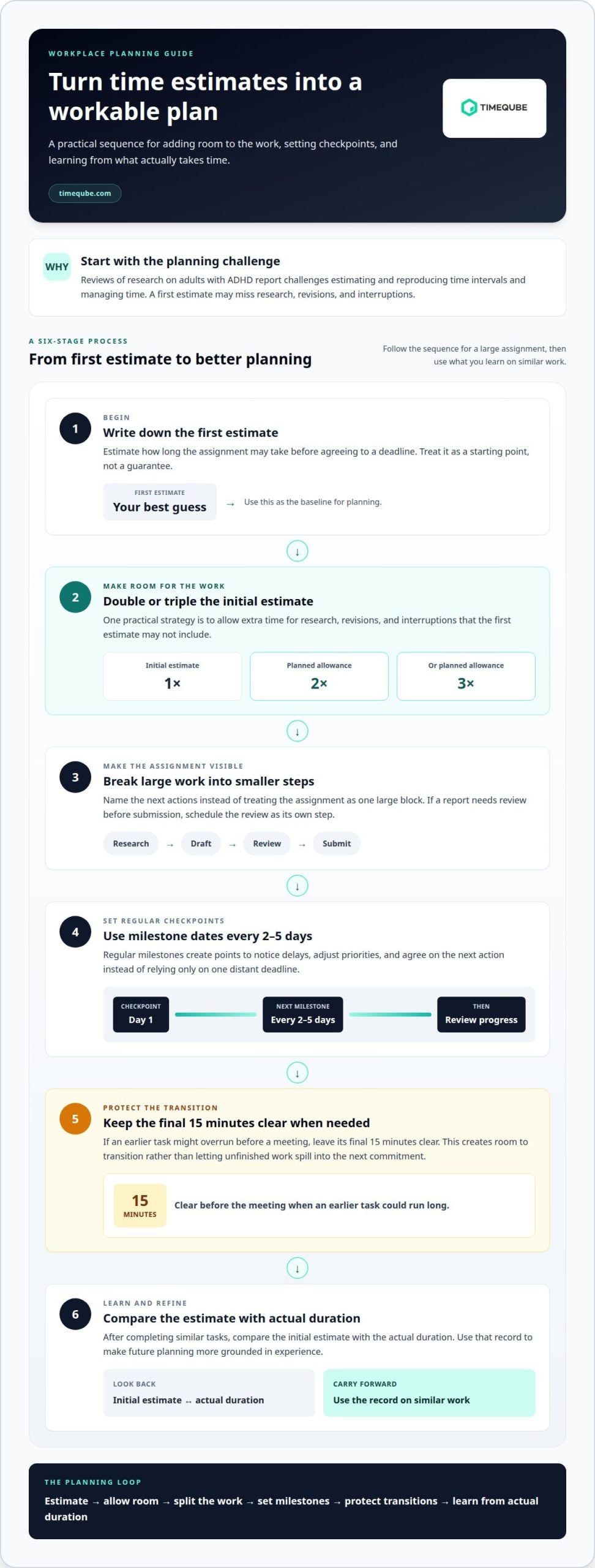
Task duration can be difficult to predict, even when the work is familiar. Reviews of research on adults with ADHD report challenges estimating and reproducing time intervals and managing time. One practical strategy is to double or triple an initial estimate before agreeing to a deadline. The extra allowance creates room for research, revisions, and interruptions that a first estimate may miss. After completing similar tasks, compare the estimate with the actual duration. That record can make future planning more grounded in experience.
Build buffers around tasks that often expand. If a report needs review before submission, schedule the review as its own step rather than treating it as spare time. For meetings, keep the final 15 minutes before the start clear when an earlier task might overrun. For project work, set milestone dates every 2-5 days instead of relying only on one distant deadline. The interval gives the employee and supervisor regular points to notice delays, adjust priorities, and agree on the next action.
Large assignments are easier to monitor when divided into stages with milestone deadlines and checklists. A project plan might separate gathering information, outlining, drafting, reviewing, and submitting. Each stage should name a visible outcome, such as a completed outline, rather than vaguely asking someone to “make progress.” A checklist can also show what remains after an interruption. When a milestone slips, the employee can identify the delayed stage and revise the next step without losing sight of the full project.
Planned breaks can support attention during sustained work. One example is a 5-minute break every 25-30 minutes; another is a 10-minute break every 90 minutes. The useful rhythm depends on the task and the employee’s concentration pattern. A break can include a few minutes of movement before returning to the same task or beginning another. A workstation that allows brief standing or stretching can make that transition straightforward. Keep break timing visible in the work plan, so it supports task completion rather than becoming an uncertain pause.
Sensory tools and movement options should address a specific work barrier. For example, an employee who finds prolonged sitting disruptive could arrange a workstation that allows them to change posture during a task. Someone who needs a clear transition can pair a movement break with a written note naming the next action. After a work cycle, review whether the tool or break helped the employee resume work, maintain focus, or complete a milestone. Keep what supports the task and adjust what adds friction.
4. Requesting accommodations under the ADA
Start by identifying the work barrier and the adjustment that could address it. For example, describe how meeting transitions affect punctuality, then request a calendar prompt or a defined arrival window. The U.S. Equal Employment Opportunity Commission explains that employers must provide reasonable accommodations to qualified individuals with disabilities so they can perform essential job functions. Under the ADA, a disability is a physical or mental impairment that substantially limits a major life activity, according to the U.S. Equal Employment Opportunity Commission.
If an employer denies a reasonable accommodation, ask for the reason and discuss whether another adjustment could address the same barrier. Keep a record of the request, the response, and any alternatives proposed. If you believe the denial involved discrimination or a lack of good faith, you may consider speaking with an employment or human rights lawyer.
A useful request connects an accommodation to a specific duty. Instead of asking generally for more flexibility, explain which task is affected and what change may help. For example, if back-to-back meetings make it difficult to arrive prepared, request a short transition interval or meeting reminders. If a fixed start time creates a barrier, propose adjusted hours that still cover essential responsibilities. Clear examples keep the conversation focused on job tasks and workable supports.
Prepare for an interactive discussion with your supervisor or the appropriate workplace contact. Describe the difficulty in work-related terms, identify possible adjustments, and explain how each could support essential functions. A quiet workspace, regular supervisor check-ins, or job coaching are examples of supports an employee can request. The best fit depends on the barrier: a check-in could clarify priorities, while a quieter setting could reduce interruptions during detailed work.
Keep the scope practical. An accommodation addresses barriers in the work environment, not the steps involved in getting ready or leaving home. If morning preparation is the main difficulty, workplace changes may not solve that part of the problem. Focus the request on work-related effects, such as late arrival for a required shift or missed meetings. A supervisor can then consider which duties require a specific time and whether another arrangement could preserve coverage.
Medical documentation may be requested to support an accommodation request. A healthcare provider can help describe how a condition affects work and identify adjustments to discuss. Share information relevant to the request, and consider workplace safety and privacy before disclosing personal details. For example, explain the need for a transition cue without sharing unrelated health history. Keep the request focused on the connection between the barrier, the proposed adjustment, and the essential job function.
5. Choosing accommodations based on workplace bottlenecks
Start with the point where work consistently loses momentum. Is the main difficulty starting a task, noticing elapsed time, switching between meetings, or recovering after interruptions? Name the specific moment and its effect. For example, an employee may finish a report late because research expands, or miss a meeting because a prior task runs over. These are different barriers and call for different supports.
Match each support to the barrier it addresses. A calendar prompt may help someone notice an upcoming commitment, while a written checklist can clarify the next step after an interruption. If task duration is the problem, use staged deadlines and review progress at each milestone. If switching tasks causes delays, schedule a transition interval between activities. A support is useful when it changes a concrete part of the workday, not simply when it adds another reminder.
Meetings can create several bottlenecks at once: preparation, punctual arrival, extended discussion, and follow-up. Shorter meetings with breaks between them can create time to reset and record decisions. A colleague meeting 5-10 minutes beforehand can help an employee prepare materials and confirm the agenda. Afterward, written summaries with clearly assigned action items can reduce uncertainty about who does what next. Choose only the meeting supports that address the employee’s actual difficulty.
Keep the initial plan focused. One suggested approach is to choose 2 to 4 accommodations based on the employee’s biggest bottleneck. For instance, someone who struggles with meeting transitions might try a pre-meeting prompt, protected transition time, and a concise written agenda. Someone whose main barrier is completing long assignments might use smaller milestones, a progress check-in, and a clear task checklist. Avoid stacking tools that solve the same problem while leaving the main barrier untouched.
Review the plan using observable work examples. After an agreed period, discuss whether meetings start more smoothly, milestones are clearer, or follow-up tasks are completed with fewer missed handoffs. If a support creates extra interruptions, adjust or replace it. Keep changes linked to essential duties and team coordination. This keeps the conversation focused on the work process rather than assumptions about motivation or effort.
For a shared task or meeting, a visible time cue can make a start, transition, or finish easier to notice. Explore visual time cues for structured work periods as one possible support when that sensory signal fits the bottleneck.
Timeqube: Timequbes with Your Logo
Timeqube offers a physical visual timer with color-coded light signals, creating a visible cue for a defined work period. It may suit teams that want a shared, non-digital prompt for meeting transitions or focused tasks. Timequbes with Your Logo can bring that cue into a branded workplace setting. For structured professional meetings, Timeqube for Business Meetings offers a relevant option. Timeqube for Mind/Body Therapies is designed for therapy settings, rather than as a workplace accommodation. A visual timer can complement a schedule or task plan, but it does not replace adjustments matched to an employee’s specific work barrier. If a shared visual cue fits your team’s needs, contact Timeqube to discuss it.
Make Your Next Adjustment Deliberate
A workplace plan can evolve as duties, team rhythms, and sources of friction change. Treat each accommodation as a practical arrangement to review, not a fixed judgment about someone’s ability. Agree on what the support should make easier, then use concrete work examples to discuss whether it fits. A smoother handoff, clearer task ownership, or more predictable meeting transitions can show what to refine next.
The most useful workplace accommodations for time blindness connect to real work needs and are revisited through open communication. Employees and supervisors can keep the conversation grounded by naming the barrier, describing its effect, and considering an adjustment that preserves essential responsibilities. This process makes room for practical solutions without expecting one tool to address every challenge.
If a visual time cue could support your team’s routines, contact Timeqube to discuss your needs. Small, considered changes can help create a workday with more clarity and less friction.
Frequently Asked Questions
What workplace accommodations help employees manage time blindness?
Useful supports depend on where time awareness affects a particular duty. For example, an employee who loses track during solo work might benefit from a visible task endpoint, while someone who misses handoffs may need clear ownership and written transition notes. A supervisor can connect each support to a work outcome, such as completing a report section or joining a scheduled team discussion prepared.
What accommodations for time blindness are available under the ADA in the United States?
The ADA may support reasonable adjustments for a qualified employee with a disability, depending on the job and the barrier. The U.S. Equal Employment Opportunity Commission explains that accommodations enable qualified individuals to perform essential job functions, provided they do not impose undue hardship. Possible requests could include adjusted scheduling, clearer written instructions, or prompts tied to work tasks. The assessment is individual, not automatic.
How can an employee request workplace accommodations for ADHD-related time blindness?
Make a clear request to a supervisor or the appropriate workplace contact. Describe the work difficulty, the duty it affects, and an adjustment that could help. For example: “I lose track of time during independent review, and a planned check-in would help me flag delays before submission.” Keep the discussion focused on work needs, then record the agreed support and how progress will be reviewed.
What documentation can an employer request for time-blindness accommodations?
An employer may ask for medical documentation to support an accommodation request. Documentation can help explain the work-related limitation and why a proposed adjustment may help. Share information relevant to those points rather than unrelated health details. The request can depend on the circumstances. An employee can discuss the needed support with a healthcare provider and ask what information addresses the workplace barrier.
Can employers provide flexible schedules, reminders, timers, or task-management tools as accommodations?
Yes, these may be considered as adjustments when they address a work-related barrier. A flexible start may suit duties that do not require coverage at one fixed time. A reminder or visual timer may help with transitions during a defined task. The employer and employee can consider whether the tool fits the role, preserves essential duties, and supports clear coordination with colleagues.
How do time-blindness accommodations differ for remote, hybrid, and on-site work?
The work setting affects which barriers need attention. Remote employees may need explicit handoff notes or scheduled check-ins with a supervisor. Hybrid teams may clarify which tasks require on-site presence and how meeting changes are communicated. On-site employees may benefit from visible transition cues or protected preparation time. In each setting, connect the adjustment to the actual duty and how the team coordinates it.
What are employers’ obligations and limits when providing accommodations under the ADA?
According to the U.S. Equal Employment Opportunity Commission, employers must provide reasonable accommodations to qualified individuals with disabilities so they can perform essential job functions, unless the accommodation causes undue hardship. Essential functions are fundamental duties of the position. An adjustment addresses a barrier; it does not automatically remove those duties. Employers can consider the job’s requirements and whether a proposed change is workable in that context.
What does time blindness mean in the workplace, and what conditions can cause it?
Time blindness can make it hard to perceive how much time has passed or remains, remember the order of events, or repeat a task for the same duration. It is particularly associated with neurodivergence; ADHD, narcolepsy, sleep apnea, and medication-related drowsiness may contribute to related time-management or punctuality difficulties.