
The phone you reach for to protect your focus can also reopen the door to distraction. If you’ve wondered why phone timers are bad for focus, the issue may not be the countdown itself. It’s the notifications, visible apps, and temptation to check one more thing when you unlock the screen.
That doesn’t mean a phone timer is always the wrong choice. It can work well when your phone is already needed for the task, or when you can silence alerts and leave the timer running. But if starting or checking it pulls your attention elsewhere, the method may be working against your intention.
This article explains how phone-based timing can interrupt focus, when it still makes sense, and how to choose a lower-friction alternative. You’ll also see how a physical visual timer, such as Timeqube, uses color-coded light signals to show time without requiring another screen check. The goal isn’t to ban your phone. It’s to add time structure without restarting the attention loop.
Key Takeaways
- Why phone timers are bad for focus often comes down to the device around the timer, not the timing method itself.
- Even a brief task switch can make it harder to return smoothly to the work you were doing.
- Compare phone timers, physical timers, and working without a visible timer by setup effort, visibility, and fit for the task.
- Build a simple timing routine: choose one task, set a realistic interval, silence nonessential alerts, and begin.
- A physical visual timer can make elapsed time easier to notice without opening a timer app.
Why phone timers can interrupt the focus they are meant to protect
A timer gives work a clear beginning and endpoint. The complication is that a phone timer shares space with messages, email, social feeds, and other attention-demanding cues. Setting a countdown may take only a moment. When you pick up the device to check it, you face another decision: look only at the timer, or respond to whatever else is on screen?
A phone timer adds time structure, but it also keeps unrelated digital activity within reach. That doesn’t make phone timers inherently harmful. It means the timer and the phone’s other functions can appear in the same interaction.
What changes when a timer lives on your phone?
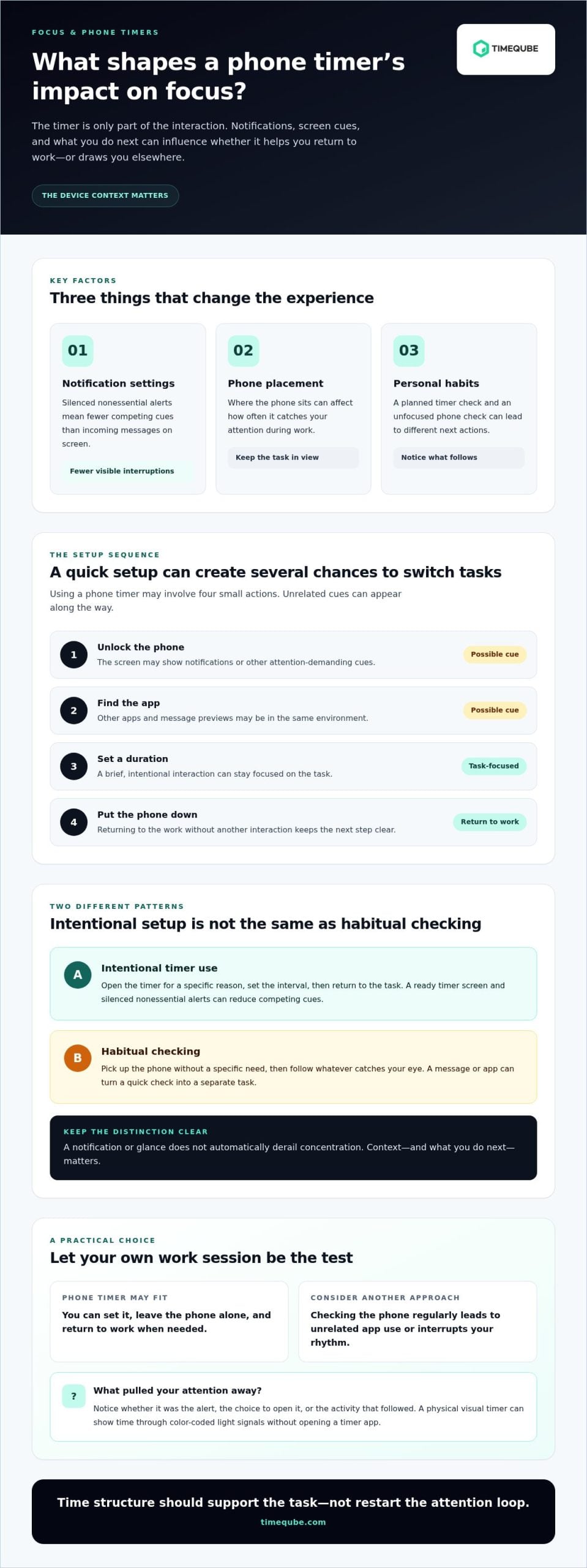
To start a timer, you might unlock your phone, find the app, set a duration, and put the device down. Each step is an opportunity for an unrelated cue to catch your attention. A notification could appear. You might see a message preview, open it, or tap another app before the countdown begins.
That sequence is different from simply using a timer. Opening the tool to set or check the time is intentional. Habitual checking is less directed: you pick up the phone without a specific need, then follow whatever catches your eye. The two behaviors can overlap, but they aren’t the same.
For example, someone writing a report may unlock their phone to set a work interval. If a work message appears, they may decide to reply before beginning. Someone else, with notifications silenced and the timer app ready, may set the interval and return to writing without another interaction. The device is the same, but the context and next action differ.
Is the phone timer itself the problem?
Not necessarily. The experience depends on factors such as notification settings, where you place the phone, and your habits. A phone left on a clear timer screen with nonessential alerts silenced presents fewer competing cues than one displaying incoming messages. Individual responses still vary.
So, asking why phone timers are bad for focus can point to the wrong culprit. A more useful question is whether using yours draws you into activity unrelated to the task. If you can start the timer, leave the phone alone, and return only when needed, it may suit your routine.
If unlocking the device regularly turns a quick timer check into unrelated app use, the phone’s broader environment may be creating friction. Treat that as a practical signal, not a diagnosis or a reason to judge your habits. Notice what happens during your own work session, then choose a timing method that asks less of your attention.
How notifications and task-switching can pull attention away
A notification can act as a cue that something may need attention. Its effect depends on the alert, the task, and whether you respond. A silent banner during routine filing may be easy to ignore. The same cue while you’re composing a careful argument may prompt you to pause and decide whether it needs action.
An unnecessary phone interaction can interrupt your train of thought, even if it takes only a moment. That’s a possibility, not a guaranteed outcome. Seeing a phone isn’t the same as being distracted, and glancing at a timer doesn’t automatically derail concentration. Context and what you do next matter.
Why a small check can become a task switch
The sequence can be simple: you pause, unlock the screen, notice a message preview, then choose whether to engage. The cue itself may be brief. Reading the message or opening an app shifts your attention to different information and a new goal.
Returning to demanding work can take effort. If you were holding several details in mind while drafting or calculating, you may need to reconstruct where you were and what you planned to do next. That added friction can help explain why a quick check feels disruptive. It doesn’t mean every glance causes a measurable loss, or that everyone experiences the same interruption.
What the evidence can, and cannot, say
Research on smartphone presence offers context, but it isn’t direct evidence about timer apps. A study reported by the University of Texas at Austin examined whether having a smartphone nearby affected available cognitive capacity. It did not test whether setting a timer or checking a countdown interrupts work.
That distinction matters. Findings about phone presence, frequent checking, or notifications shouldn’t be presented as proof that a phone timer harms every user. Nor do they establish that ordinary phone use signals addiction or cognitive decline. They point to possible influences on attention, while leaving room for differences in tasks, settings, and habits.
In practice, notice the moment your attention shifts. Was it the alert, the choice to open it, or the activity that followed? If a timer check routinely turns into a separate phone task, reducing that interaction may help preserve your working rhythm. A physical visual timer, such as Timeqube’s visual timer, shows time through color-coded light signals without opening a timer app. It won’t remove every distraction, but it can keep time cues separate from phone activity.
Phone timers and focus: myths, trade-offs, and when they work
A phone timer isn’t automatically a focus problem. Convenience, accessibility needs, familiar routines, and the task all matter. The useful question is whether using it adds competing activity or simply gives you a clear start and endpoint. A timer can support a work routine when the interaction stays brief. Another method may feel easier if checking the phone repeatedly interrupts your rhythm.
When a phone timer may be a good fit
A phone timer can work well for a short, clearly bounded task if you can set it and leave the device locked. For example, set one to time a brief review, then keep the phone out of sight while you finish. Focus settings or silenced notifications may reduce competing alerts, though they can’t guarantee that nothing will draw your attention.
Choose this option if it fits your habits and setting. If the phone stays quiet and you aren’t pulled to check it, there may be little reason to change your method.
When another timing method may feel easier
For sustained concentration, or work that leads you to check the countdown often, separating the time cue from the phone may reduce an extra step. A physical visual timer communicates time through color-coded light signals, so you can notice a visual cue without opening an app. It won’t remove every possible distraction, but it offers another way to keep time visible.
The choice is about fit, not a rule against phones. Consider whether you need frequent time awareness, whether your phone is essential to the work, and how each method feels in practice. If phone checks tend to lead elsewhere, a separate cue may be simpler. If the phone timer stays unobtrusive, convenience may win.
A low-distraction routine for timing focused work
A timer works best as quiet structure, not another reason to monitor a screen. Build a short routine that helps you begin, stay with one task, and notice a natural stopping point. The goal isn’t to follow a perfect productivity formula. It’s to reduce avoidable decisions while you work.
Set up the work period before starting
Decide what you’ll do and what a reasonable stopping point looks like before setting the timer. “Draft the opening section” gives you a clearer target than “work on the project.” Choose an interval that feels manageable for the task and your current energy. There’s no single duration that suits everyone, so adjust it between work periods.
- Choose one task. Write down the next concrete action, such as reviewing a document or outlining a presentation. Keep other tasks out of the work period unless something genuinely urgent comes up.
- Set a realistic interval. Pick enough time to make progress without turning the countdown into a test of endurance. For unfamiliar or complex work, begin with a shorter period and adjust based on experience.
- Silence nonessential alerts. If your phone is needed for the task or is your only timer, use its focus or notification settings to reduce interruptions. These settings can help limit competing cues, though they can’t guarantee that every interruption will be blocked.
- Place the phone out of reach if you don’t need it. Set the timer first, then put the device somewhere you won’t casually pick it up. If you need the phone, keep it on the relevant screen and avoid checking it before the planned stopping point.
- Begin, then check at a transition. Let the timer mark the end of the work period rather than repeatedly glancing at the screen. Use the signal as a prompt to pause, finish a thought, or decide what comes next.
Choose a timer cue that supports the task
Match the cue to your work environment and preferences. A sound may suit a task where the phone can stay put. A screen display may work if you can see it without opening other apps. A visual signal from a separate timer can make time easier to notice without repeated unlocking. For some tasks, no visible timer is a better fit. Time structure should support the work, not compete with it.
Afterward, assess the method. Did the cue help you keep a steady pace, interrupt your concentration, or make no noticeable difference? That reflection can guide your next choice. For more ideas on managing time offline, explore this guide to tangible time management tools. If you want a separate visual cue for focused work, explore Timeqube’s physical visual timer.
A physical visual timer offers time awareness without another phone check
A physical visual timer separates the time cue from the phone’s other functions. Instead of unlocking a screen to see a countdown, you can look at a device that communicates time through color-coded light signals. You’re noticing a cue in your workspace, not reopening a phone interface where other apps and alerts may compete for attention.
This can be useful during work that benefits from a gentle sense of elapsed time, such as drafting, planning, or a focused session between meetings. The timer doesn’t do the work for you or guarantee concentration. It offers a separate way to keep time in view, while you decide when to glance at it and how much structure suits the task.
What a visual timer changes in the timing experience
A visible light cue can make the passage of time easier to perceive at a glance, without opening a timer app or navigating a screen. You still choose whether to look and when. For example, place a timer within view and continue working until a planned transition, rather than checking a digital countdown whenever you feel uncertain about the time.
Timeqube for mind-body therapies uses a physical visual-timer format with color-coded light signals to communicate time. The same basic distinction applies to focused work: the cue is visible, while the phone’s broader stream of digital activity stays separate.
Decide whether a separate timer suits your routine
Consider what happens when you use a phone timer. Do you set it and leave the phone alone, or does checking the countdown often lead to unrelated activity? If the phone remains unobtrusive, keeping it may be the simplest choice. If timer checks regularly draw you into other interactions, a separate device may feel like a better fit.
Match the method to the task, too. A phone may be essential when your work relies on calls or apps. For screen-free planning, writing, or a session where you want time awareness without extra phone contact, a physical visual timer can offer a clear alternative. The best choice is the one that gives you useful structure with minimal friction.
There’s no universal answer to why phone timers are bad for focus. A phone timer may work well for one person and feel disruptive to another. Pay attention to your own pattern: can you start it, leave it, and return at the planned transition? If the extra screen interaction doesn’t serve you, try a separate visual cue for a work period and notice how it fits your routine.
For a physical option that communicates time through color-coded light signals, explore Timeqube and see whether it suits your routine.
Choose the timing method that gives your attention room
Your next step doesn’t need to be a complete change in routine. Try one focused work period with the timer method that feels easiest, then notice whether it helps you stay present or invites extra checking. Keep what supports your work and adjust what adds friction. There’s no single setup that suits every task or person.
If you’d like to move time awareness away from your phone, Timeqube offers physical visual timer hardware that uses color-coded light signals rather than digital timer software. It’s an option when you want a separate time cue in your workspace, without expecting any timer to guarantee focus.
Explore Timeqube to find a separate visual cue for your workspace. Understanding why phone timers are bad for focus can help you choose a timing method without treating your phone as the problem in every situation. A small, thoughtful change can make it easier to begin with intention.
Frequently Asked Questions
Are phone timers actually bad for focus, or does it depend on how I use my phone?
It depends on how you use your phone and what the task demands. If you start a timer and leave the device alone, it may fit your routine well. If opening it leads you to messages or feeds, another method may feel less disruptive. To assess why phone timers are bad for focus for you, notice what happens before, during, and after a timed session rather than assuming the same effect for everyone.
Can a phone timer distract you even when notifications are turned off?
Yes, though the risk may be lower without alerts. Unlocking the phone can still expose its home screen, app icons, or message badges, and you may feel drawn to check them out of habit. Try opening the timer before work begins, then lock the screen and leave it face down. If you still find yourself picking it up, a timer that stays separate from your phone may suit that session better.
How can I use my phone as a timer without checking other apps?
Make the timer interaction as direct as possible. Before starting work, close unrelated apps, open the timer, set the duration, and lock the screen. If your device offers a focus setting, use one that limits interruptions while preserving access to tools you genuinely need. You could also place the phone behind your keyboard or on a shelf, where it can’t invite casual browsing but remains available if the task requires it.
What happens if I keep checking the timer while trying to focus?
Repeated checks can interrupt the flow of a task, especially if each glance becomes a reason to reassess how much time remains. They may also shift your attention from the work to monitoring progress. Instead, decide in advance when you’ll check, such as at the end of a paragraph or after completing one defined step. If you’re checking because the task feels difficult, a brief pause may help more than another look at the countdown.
Is a visual timer better than a phone timer for deep work?
It can be a better fit if seeing a separate time cue helps you avoid opening your phone. A physical visual timer uses a visible signal to show time passing, while a phone timer shares its screen with other digital functions. Neither option is best for every person or task. If your work depends on phone-based tools, for example, a phone timer may be more convenient than adding another device.
Can putting my phone out of reach improve concentration during timed work?
It may help if having the phone nearby leads you to handle or check it, but it won’t guarantee concentration. Test the change during a task that doesn’t require the device, such as reading a printed document or sketching an outline. Put the phone in a drawer or another room for that work period, then compare how often you feel pulled away. Keep it accessible when safety or the task requires it.
Do phone timers cause attention problems, or are notifications the main issue?
A timer app isn’t shown by the evidence discussed here to cause an attention disorder. Notifications are one possible distraction, but screen access, app cues, and personal checking habits can also shape the experience. These factors may interrupt a work session without indicating a clinical problem. If attention difficulties persist across settings and interfere with daily life, consider discussing them with a qualified health professional rather than attributing them to timer use alone.