

Access alone doesn’t make a meeting inclusive. An inclusive meeting gives participants a way to access the discussion, feel respected and connected, and contribute their perspectives. The most useful tools for inclusive meetings support participation before, during, and after the conversation.
Clear roles, a descriptive agenda, and thoughtful ways to participate can reduce friction without making meetings feel over-managed. Hybrid meetings also need deliberate attention to what remote participants can hear and see.
This guide explains what inclusion looks like in practice and offers practical resources for chairs, facilitators, and participants. Find ways to prepare an agenda, share meeting roles, and adapt participation for in-person, online, and hybrid formats. It also covers gathering feedback and helping everyone stay present in the discussion.
Key Takeaways
- Build participation into meeting roles and ground rules so people have clear ways to contribute.
- Share a descriptive agenda early, with topics and expectations that help participants prepare.
- Adapt the setup for in-person, online, and hybrid meetings, especially how participants hear and see the discussion.
- Use feedback and post-meeting summaries to understand what worked and make follow-up clear.
- Choose simple visual time cues when a meeting needs clearer pacing without adding digital distractions.
1. What is an inclusive meeting?
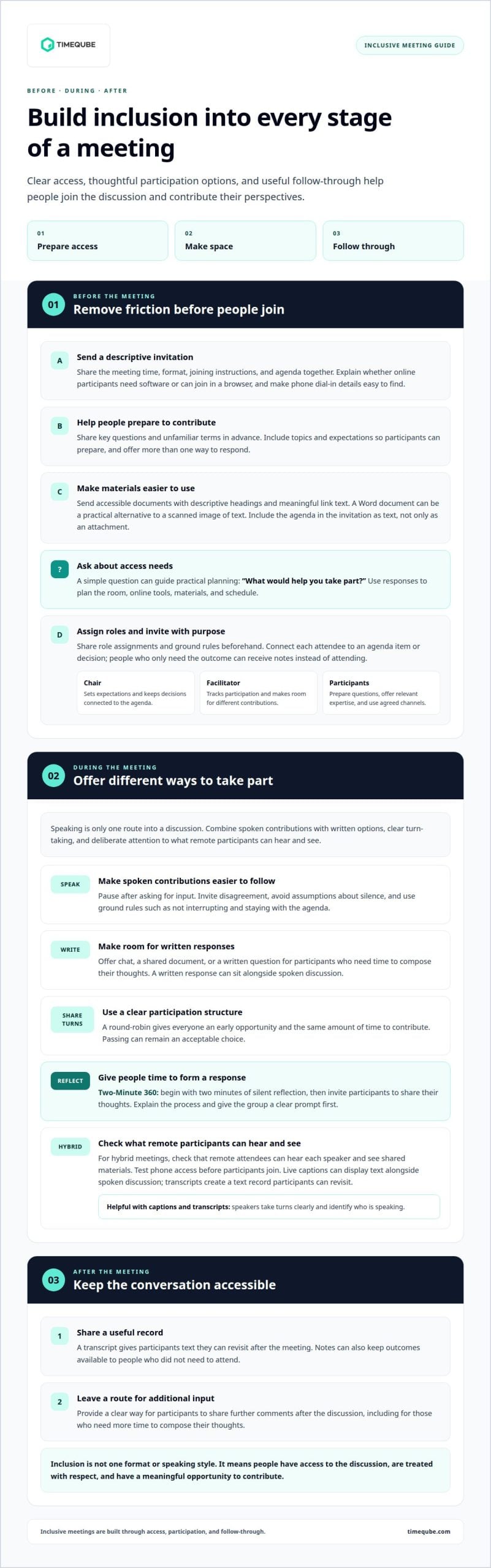
An inclusive meeting gives people access to the discussion, treats them with respect, and makes room for their perspectives. The right tools for inclusive meetings support those aims before, during, and after a conversation. A clear agenda, accessible documents, and a reliable way to join by phone can remove barriers. Inclusion is not one format or speaking style. It means everyone has a meaningful opportunity to participate.
Start with access. When scheduling, share the meeting time, format, joining instructions, and agenda together. Offer phone and videoconference options, and make dial-in details easy to find. For an online session, state whether participants need to install software or can join in a browser. These steps help people prepare and reduce avoidable friction at the start.
Neurodiversity and different ways of processing information also matter. Some participants benefit from seeing a topic in writing before discussing it; others may prefer to listen before responding. Share key questions in advance, explain unfamiliar terms, and pause after asking for input. Offer a written response option alongside spoken discussion. These choices provide more than one way to participate without asking anyone to disclose a diagnosis.
Document access is part of meeting access. Send materials in an accessible format, and provide an alternative if a file does not work with someone’s assistive technology. A Word document can be a practical alternative to a scanned image of text. Use descriptive headings and meaningful link text so readers can navigate materials. Include the agenda in the invitation as text, rather than relying only on an attachment.
Ask participants about access needs before the meeting. An invitation can simply ask, “What would help you take part?” Use responses to plan the room, online tools, materials, and schedule. For an in-person meeting, consider whether the room and seating arrangement support participation. For a hybrid meeting, check that remote attendees can hear each speaker and see shared materials. Test phone access before participants join.
When selecting meeting tools, use WCAG accessibility criteria as a practical benchmark and assess ADA considerations for your organization and meeting context. Look for usable keyboard controls, clear navigation, and compatibility with assistive technology. A checklist can help compare a tool’s interface with how participants need to join, follow, and contribute. Don’t treat a single accessibility feature as proof that the full meeting experience is accessible.
Live captions display text alongside spoken discussion. They can support people who are deaf or hard of hearing, people joining from noisy settings, and those who process written information more easily. Transcription creates a text record that participants can revisit after the meeting. Captions and transcripts work best when speakers take turns clearly and identify who is speaking.
Inclusive meeting tools don’t have one fixed price. Costs depend on whether a feature is built into existing videoconferencing, added through a subscription, or provided by separate transcription or accessibility tools. Compare the features needed, number of users, and billing model. A team that needs captions only has different requirements from one that needs searchable transcripts and accessible document workflows.
2. Meeting chair, facilitator, and participant resources
Inclusive meetings work better when chairs, facilitators, and participants understand their roles. The chair sets expectations and keeps decisions connected to the agenda. The facilitator tracks participation and makes room for different contributions. Participants can prepare questions, offer relevant expertise, and use agreed channels to respond. Share role assignments and ground rules beforehand so everyone knows how to help the discussion work.
Keep the invitation list tied to the agenda. Invite people whose knowledge, decisions, or responsibilities are needed for the topics. A crowded call can make it harder for quieter participants to find space, while unnecessary attendance can dilute ownership. Before sending an invitation, connect each attendee to an agenda item or decision. If someone only needs the outcome, share the notes afterward instead of requiring them to attend.
Marginalized participants may face barriers that are not visible in the meeting room. Seniority can make disagreement feel risky. Language differences, disability, and cultural expectations around interruption can also affect who speaks. For multinational teams supporting non-native speakers, professional language courses from providers such as Learning Explorer can help build communication confidence, while chairs can reduce immediate meeting pressures by welcoming disagreement, offering a way to contribute in writing, and avoiding assumptions about silence. For example, invite private written input before asking for spoken reactions.
To limit one person’s airtime, set ground rules such as not interrupting, staying with the agenda, and welcoming ideas. If someone repeatedly dominates, the facilitator can invite others in: “Let’s hear from someone who hasn’t spoken yet.” Another option is to ask the frequent speaker to scribe, shifting their attention to recording the group’s ideas. A talking stick can also support turn-taking, with only its holder speaking.
For a structured approach, the Two-Minute 360 technique includes two minutes of silent reflection. Participants then share their thoughts, giving people time to form a response before discussion moves quickly. A round-robin can also give everyone an early opportunity and the same amount of time to contribute. These methods work best when the chair explains the process first, gives participants a clear prompt, and makes passing an acceptable choice.
Speaking isn’t the only way to participate. Offer a chat response, shared document, or written question for people who need time to compose their thoughts. If someone is quiet, invite their view without putting them on the spot. The group can first write responses to a prompt and share them together. Afterward, provide a clear route for additional comments. These options make participation more flexible without requiring anyone to explain why they prefer another mode.
Diversity Council Australia describes its inclusive meeting guide and checklist as resources for chairs, facilitators, and participants. When someone is not contributing, the group can write responses to a question and share them. Alternatively, the organizer can invite the person to contribute directly without making them uncomfortable.
3. Preparing and sharing a descriptive agenda
A useful agenda shows participants what the meeting will cover and what each topic needs to achieve. Write one for every meeting and send it as early as possible. A clear agenda gives people time to prepare their thoughts, identify questions, and consider where their experience can help. “Discuss the rollout” gives little direction. “Identify rollout risks and agree on owners for follow-up” signals the intended outcome.
Review the purpose before adding agenda items. Ask whether the meeting needs to share information, gather input, make a decision, or assign work. Each item should describe the task and expected result. If a discussion needs a decision, name it. If participants need to provide feedback, say what kind would be useful. This clarity helps people arrive ready to contribute instead of spending meeting time figuring out why the topic is on the agenda.
Give every item enough context to make preparation possible. Name the topic, the person leading it, and any document participants should review. For example: “Review the draft onboarding guide. Bring edits on the handoff steps.” Avoid unexplained abbreviations or internal shorthand. If a pre-read is attached, state its purpose and whether participants should comment before the meeting or discuss it together.
Share the agenda with the meeting invitation, and update it if the purpose changes. Early notice matters because participants may need time to read materials, organize ideas, or prepare a written contribution. If a new issue arises, describe it clearly and explain how it connects to the meeting’s goal. Don’t add a major decision without giving people relevant context first. Make changes visible in the revised agenda so attendees aren’t surprised during the discussion.
- Topic: State the subject in plain language.
- Purpose: Identify whether the group will discuss, review, decide, or plan.
- Preparation: Name the pre-read, question, or contribution participants should bring.
- Outcome: Describe the decision, feedback, or next step the item should produce.
Before sending, read the agenda from a participant’s perspective. Could someone who missed the earlier conversation understand each item? Can they tell what to prepare and how to contribute? Replace a broad label such as “Updates” with a specific prompt, such as “Share project blockers that need team input.” This gives participants a clear entry point and helps the chair keep discussion connected to the stated outcome.
A descriptive agenda is also a working guide during the meeting. The chair can refer to the intended outcome when discussion drifts, and participants can see how each contribution fits. Afterward, the agenda can help organize decisions and actions into a useful summary. This creates continuity between preparation, discussion, and follow-up without adding unnecessary process.
4. Inclusive in-person, online, and hybrid meetings
Best practices for inclusive meeting tools start with the format, not the platform. Match each tool to how people need to hear, see, respond, and follow the discussion. Before the meeting, ask attendees what they would like to contribute and whether they need adjustments. Allow enough time for feedback and decisions, so participation isn’t squeezed out by a rushed final agenda item.
In person, consider how room layout affects visibility and turn-taking. Place microphones where speakers can reach them, and make sure people can see shared material from their seats. At the start, welcome each participant and explain why they were invited. That context helps people understand where their knowledge fits. For a check-in, keep the format suited to a smaller group, fewer than 10 people, so each person has space to respond.
Online meetings need intentional pauses and clear ways to contribute. After asking a question, leave time for people to process and respond instead of filling the silence. Invite participants to state agreement or disagreement explicitly, because silence alone shouldn’t be treated as agreement. A rotating role, such as inviting the next speaker or tracking questions, can balance participation without relying on the people who volunteer first.
Hybrid meetings require attention to both sides of the room. Place microphones so remote participants can hear people seated around the table. If someone joins by phone, pass a speakerphone to the current speaker instead of letting several voices compete from across the room. The facilitator should check that remote attendees can hear every speaker and see what is being shown. These checks help keep in-room discussion accessible to people joining remotely.
For a larger group, breakout rooms can create smaller spaces for people to contribute. Give each room a specific prompt and a clear way to share its conclusions afterward. If someone repeatedly talks over others, restate the ground rules during the meeting. When needed, speak with that person informally afterward rather than letting interruptions become the group’s normal pattern. Close by thanking participants for their contributions.
Finish with a short recap. Restate key points and decisions, check that participants share the same understanding, then review actions and next steps. A written summary helps people who need time to process the discussion or couldn’t stay until the end. Together, these practices make meetings more consistent across in-person, online, and hybrid formats. The practical test is simple: can each participant follow the conversation and contribute in a workable way?
5. What tools help make meetings more inclusive?
The best tools for inclusive meetings make it easier to contribute, revisit ideas, and share feedback. Choose them to address a specific participation barrier, not because they’re new. A quiet participant may prefer written feedback, while someone who missed a discussion may need a searchable record. A small set of well-used tools can support both without adding unnecessary steps.
Anonymous surveys or feedback tools help gather views about how meetings feel to participants. Ask focused questions, such as, “Could you contribute to the discussion?” or “What made participation difficult?” Use responses to identify patterns and adjust future meetings. If people say decisions move too quickly, for instance, add a pause before confirming them. Tie the survey to a clear improvement, then tell participants what changed.
AI-generated meeting notes can reduce the need for participants to divide their attention between listening and typing. That leaves more attention for questions, responses, and decisions. Before the meeting, explain how notes will be used and where participants can find them. Afterward, review the notes for clear decisions and assigned actions before sharing. A summary that separates “Decision” from “Next action” is easier to scan than an unstructured transcript.
A searchable transcript lets participants revisit discussion points after the meeting. It can help someone find a project name, decision, or explanation without replaying the full conversation. Share the transcript alongside the meeting summary, and explain its purpose. A transcript supports recall but shouldn’t replace a concise record of agreed decisions and responsibilities. Used together, they let participants search details and find outcomes quickly.
Choose each tool for a defined task:
- Anonymous feedback: collect candid views on participation and meeting dynamics.
- AI-generated notes: reduce live note-taking so participants can focus on discussion.
- Searchable transcripts: help attendees return to specific points after the meeting.
- Written response channels: let participants contribute ideas outside spoken turn-taking.
Introduce tools with a short explanation. Tell participants when to use them, who can access the information, and how their input affects decisions. For example, invite survey feedback after a recurring team meeting, then share one adjustment at the next session. Don’t collect feedback without following up; participants need to see how their comments inform practice.
Keep the process simple. Use a survey to learn, notes to capture outcomes, and a transcript to find details. Each tool serves a different purpose. Together, these resources can help participants contribute in the moment and stay connected to the discussion afterward.
Timeqube: Timeqube for Business Meetings
Timeqube for Business Meetings uses color-coded light signals to make time visible without digital distractions. In an inclusive meeting, a shared visual cue can help the chair keep agenda items moving while participants stay focused on the conversation. It supports time awareness, but it doesn’t replace accessible formats, captions, clear turn-taking, or other participation needs.
Consider Timeqube when a team wants a simple, physical cue for meeting pace. It can complement the agenda and facilitation practices described above, helping the group notice time without relying only on spoken reminders. Timeqube also offers Timequbes with Your Logo for businesses seeking a branded option.
For a visual time cue in your meetings, contact Timeqube.
Make your next meeting easier to join
Inclusive practice develops through attention and adjustment. Treat each meeting as a chance to notice where participation flows and where it gets blocked. A quiet pause, a written contribution, or a clearer way to track time can change how people experience the discussion. Choose one adjustment to carry into your next meeting, then invite participants to share what helped them take part.
The right tools for inclusive meetings should support the people in the room, not add complexity. Timeqube’s visual timer helps teams keep time visible while attention stays on the conversation. Consider where a physical visual cue could support your meeting rhythm.
Contact Timeqube about inclusive meetings and explore whether its meeting timer fits your needs. Small, considered changes can create more room for every voice.
Frequently Asked Questions
What is an inclusive meeting?
An inclusive meeting makes participation possible for people with different communication preferences, access needs, and levels of familiarity with the topic. For example, a project team might let members add ideas to a shared document before discussion, then invite responses aloud. This gives people more than one way to contribute and helps the group consider perspectives spontaneous conversation might miss.
What tools help remote and hybrid participants contribute equally?
Shared documents, chat, and clear audio give remote participants practical ways to follow and shape the discussion. For example, keep a collaborative notes document open so attendees can add questions while someone speaks. The facilitator can pause to read those contributions aloud and invite responses from both the room and remote attendees. This keeps useful input from getting lost in a separate chat window.
How can anonymous polls and Q&A tools include quieter participants?
Anonymous polls and Q&A tools let participants offer views without competing for airtime or attaching their names. Use a focused prompt, such as asking which proposal needs further discussion, then summarize the responses before the group decides. Explain how submissions will inform the conversation, and leave time to discuss themes, not just the most popular answer. This makes quieter input part of the meeting’s shared record.
What meeting tools support screen readers and keyboard navigation?
Look for meeting tools with usable keyboard controls, clear navigation, and compatibility with assistive technology.